明明是管理員帳號,按 Ctrl+Alt+Del 卻發現「工作管理器」呈灰色無法啟動,提示「已被系統管理員停用」。這通常是群組原則或惡意軟體修改了設定,解法很簡單。

gpedit.msc 開啟本機群組原則編輯器。
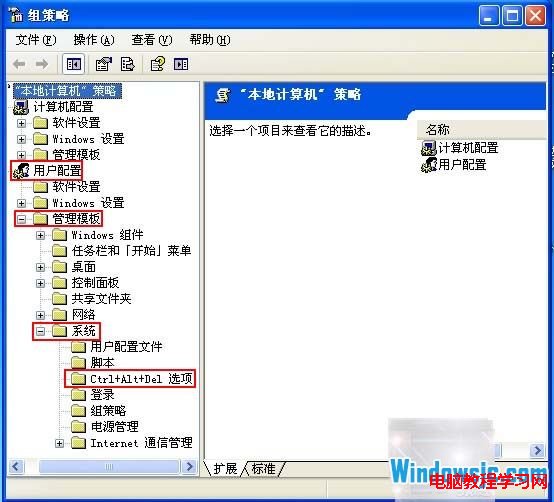
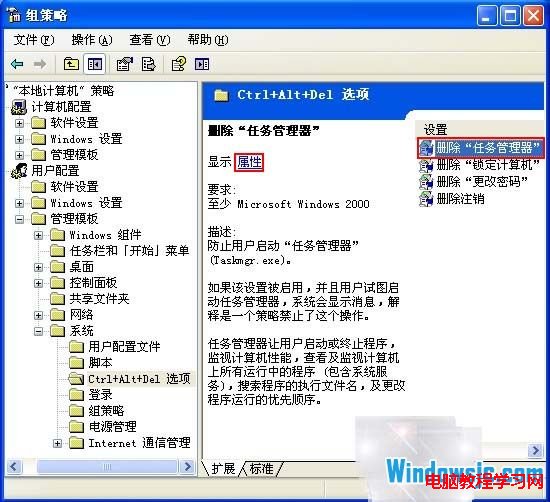
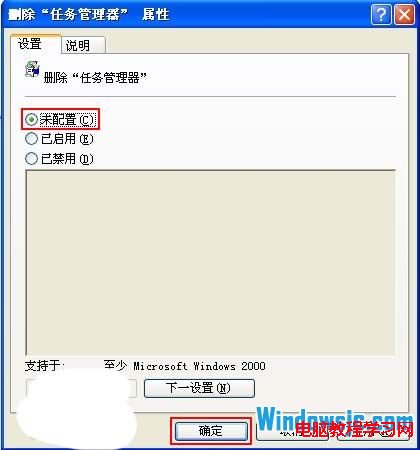
補充:若為家用版 Windows XP 無 gpedit.msc,可改用登錄編輯器修改 HKEY_CURRENT_USER\Software\Microsoft\Windows\CurrentVersion\Policies\System 下的 DisableTaskMgr 值為 0。
Win7 一鍵批量結束重複進程:taskkill 指令讓任務管理器告別手動逐個關閉
Windows 7 無法安裝印表機驅動?啟用 Print Spooler 服務即可
Win8 無法安裝 CAD2007?兼容模式安裝、自定義組件啟用「打散功能」、更改安裝目錄完整攻略
Windows 7 開機黑屏僅顯示滑鼠游標?三步驟修復 explorer.exe 缺失
Win7 100MB 隱藏系統保留分區:作用原理、建立時機與效能影響全解析
Win10 10162 升級 10240 卡在 71% 解決辦法:拔網線/重啟路由器即可