Windows 8 修改電腦名稱方式與舊版相似,透過系統屬性即可完成,需重新開機生效。
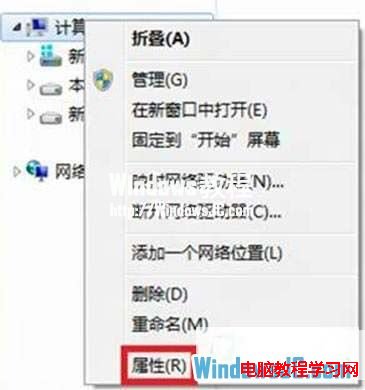
1、開啟「檔案總管」→ 右鍵「電腦」→「內容」。
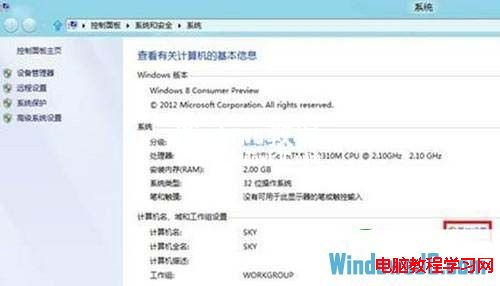
2、點選「變更設定」。
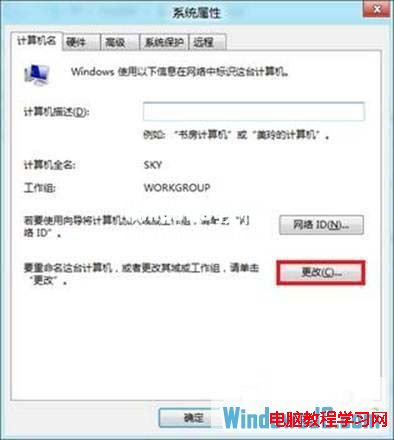
3、點選「變更」。
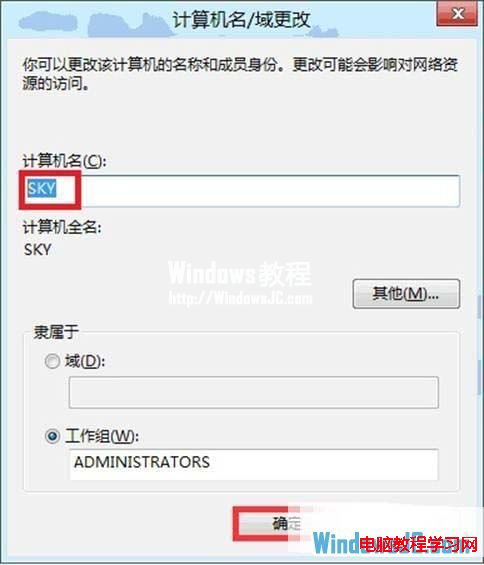
4、輸入新電腦名稱 → 確定。
5、重新開機使變更生效。
Windows 8 Build 8888 洩露版本資訊:曾被考慮為 RTM 但因關鍵錯誤被 9200 取代
Win10 Mobile 10549 新功能上手體驗影片 (重複內容)
Win10 RedStone 14271 簡體中文專業版 64位 ISO 鏡像下載 (官方 ESD 轉製、含 SHA1 校驗)
Windows 服務手動新增與刪除完整指南:註冊表法、sc 指令法、特殊情況處理
注意!Windows 10 所有內部預覽版金鑰已失效:全新安裝無法啟用,建議等待正式版釋出
隱藏桌面「資源回收筒」圖示:兩種登錄修改法
Windows 10 使用 360 WiFi 提示「缺少無線網卡」?驅動人生安裝舊版無線網卡驅動完美解決
Win10 十大隱藏實用功能大公開:非作用中視窗滾動、多螢幕縮放、儲存感知等