Windows 8 提供多種電源計畫,可根據使用情境 (筆電/桌機) 調整螢幕關閉、睡眠等待時間,平衡效能與續航力。
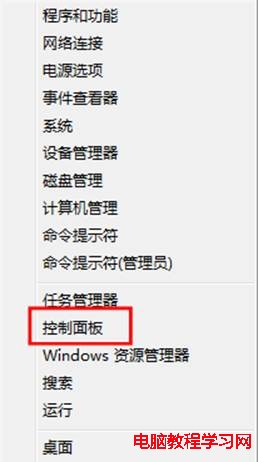
1、按 Win+X →「控制台」。
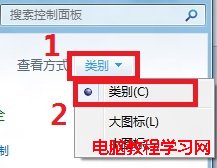
2、右上角檢視模式選「類別」→「系統和安全性」。
3、點選「電源選項」。
4、點選目前計畫右側「變更計畫設定」。
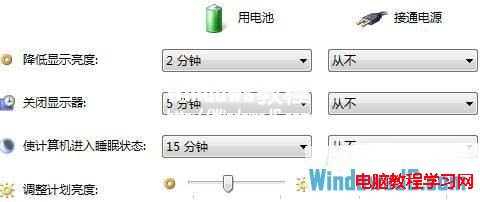
5、根據需求調整「使用電池」與「接通電源」下的「關閉螢幕」與「電腦進入睡眠」時間。
升級必死!非支援 WP 手機切勿強刷 Win10 Mobile 10536
Win10 快速呼叫 Charms 列鍵盤快捷鍵
Win7 藍屏 0x000000ED 終極修復:BIOS 預設值 + chkdsk /f /r 硬碟修復
Win10 新版本 Insider Hub 消失怎麼加回:設定 → 系統 → 應用程式與功能 → 管理選用功能 → 新增 Insider Hub
Win10 預覽版阻止自動安裝新版本:登錄表 RecoveredFrom 封鎖特定 Build 升級
Win7 開機報錯「遺失 UxTheme.dll」無法進入桌面?安全模式 SFC 修復 + 手動替換檔案雙重保險
Win10 系統開啟或關閉自動維護功能的方法
Windows 8 還原/重設電腦提示「請插入媒體」:需插入安裝光碟