硬碟預設未發揮完整效能,啟用 AHCI (Advanced Host Controller Interface) 可提升硬碟讀寫速度。需先修改登錄檔再進 BIOS 設定,免安裝額外軟體。
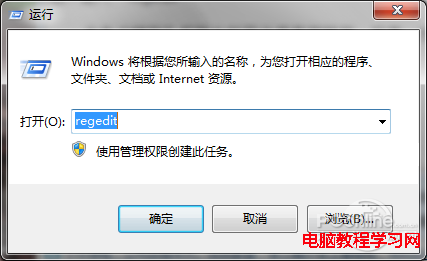
1、按 Win+R 執行 regedit 開啟登錄編輯器。
2、瀏覽至 HKEY_LOCAL_MACHINE\SYSTEM\CurrentControlSet\services\msahci。

3、雙擊右側 Start 值。

4、將數值資料從 3 改為 0。

5、重新開機進入 BIOS,將 SATA RAID/AHCI Mode 改為 AHCI(各主機板選項名稱略有不同)。

6、開機後可至「控制台」→「系統與安全性」→「檢查 Windows 體驗指數」查看硬碟分數提升情況。