有些私人檔案不想刪除也不想讓他人看見,Windows 7 內建隱藏屬性可輕鬆隱藏資料夾,隱藏後圖示呈半透明狀態,需在資料夾選項勾選「顯示隱藏檔案」才能看見。
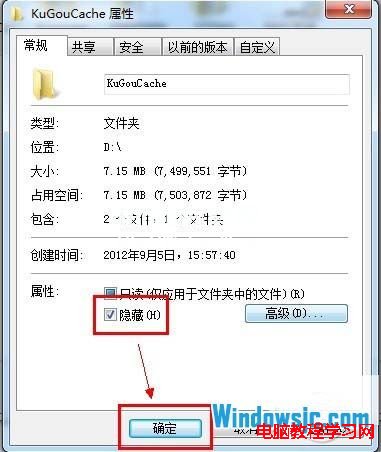
1、右鍵點選欲隱藏的資料夾 →「內容」。
2、勾選底部「隱藏」核取方塊 → 確定。
3、系統詢問是否套用至子資料夾與檔案:選「是」則整個資料夾樹隱藏;選「否」則僅隱藏該資料夾圖示。
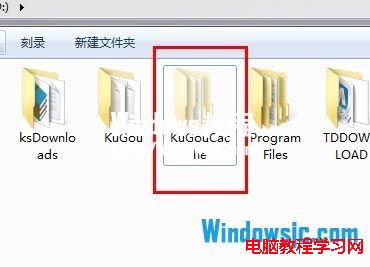
4、隱藏後的資料夾圖示會變成半透明,與一般資料夾易於區分。
Windows 8 無法玩 LOL(英雄聯盟)?多玩盒子反和諧 + 相容模式雙管齊下
WinXP 加密離線檔案保護資料安全,資料夾選項一鍵啟用 EFS 加密
Win10 隱藏檔案不顯示,三步驟輕鬆設定
Win10 修改電腦名稱讓系統更具個性
Win10 14257 官方 ISO 多國語言包下載大全:簡繁中文、英美英、日韓德俄 32/64 位完整連結
Win10 10159 簡體中文專業版 64位 ISO 鏡像下載(含軟媒魔方優化工具)
Win7 系統怎麼把時間設置為 24 小時制格式?
Win10 關閉/屏蔽強制升級通知官方方案:群組原則與登錄檔雙軌教學