安裝完成 Windows 8 後,若對預設的個人化設定不滿意,可透過電腦設定輕鬆更換鎖定畫面圖片、開始畫面背景花紋與顏色、以及使用者帳號圖片。
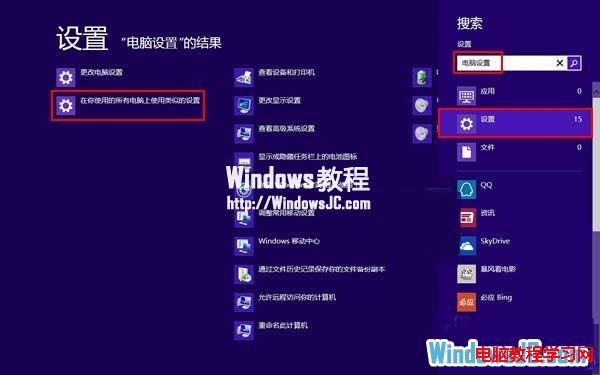
1、按 Win+C 開啟魅力列,選擇「搜尋」。
2、在搜尋面板點選「設定」,輸入「電腦設定」,點選「在你使用的所有電腦上使用類似的設定」。
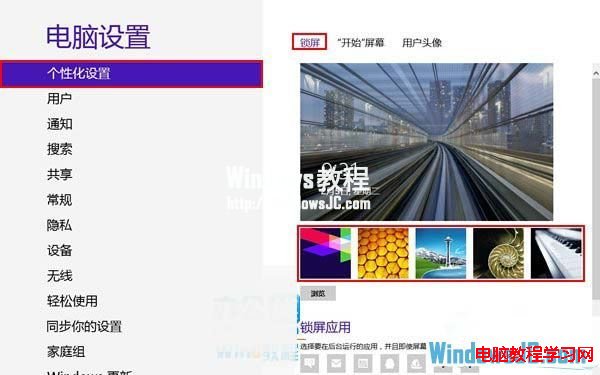
3、進入「個人化」→「鎖定畫面」,可自由選擇鎖定畫面圖片。
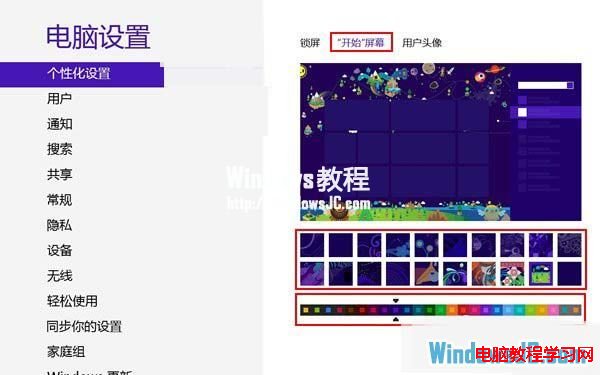
4、點選「開始畫面」,可更換 Metro 桌面背景圖案與背景顏色。
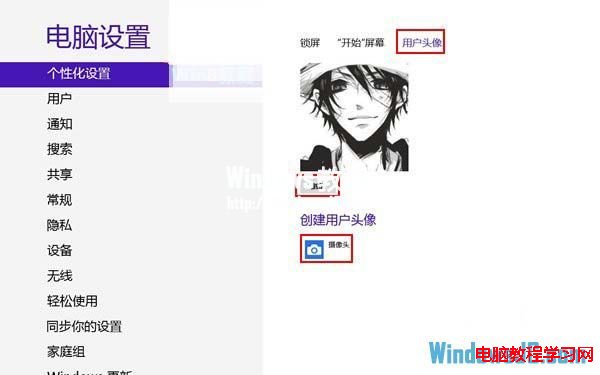
5、點選「帳號圖片」,可選擇圖片或使用網路攝影機拍攝作為使用者圖片。
Win10 TH2 10586.318 累積更新 KB3156421 釋出:修正藍牙、小娜、Edge 等穩定性問題
Windows 10 Build 10565 Edge 瀏覽器新增 HTML5 影片播放控制:暫停、靜音、儲存、6 段播放速度調整
Win10 工作檢視有什麼用?虛擬桌面多工管理:新增/切換/關閉桌面,視窗總覽一目了然
Win10 如何查看與設定螢幕解析度?右鍵桌面兩步驟完成
Windows 10 超級按鈕開啟方法:觸控螢幕自動顯示、滑鼠鍵盤 Win+C 快捷鍵
Win10 自訂資料夾/捷徑圖示:右鍵內容→自訂→更換圖示,支援 .bmp 轉 .ico 免轉檔
Win10 藍畫面出現 QR Code?掃描即可獲取錯誤代碼與修復建議
Win7 點擊工作列音量圖示無反應?登錄表新增 Systray 值修復音量控制