Windows XP Windows 7 Windows 2003 Windows Vista Windows 綜合教學 Linux 系統教學
Windows 10 Windows 8 Windows 2008 Windows NT Windows Server 電腦軟體教學
您现在的位置: Windows教程網 >> Windows教程 >  >> Windows 綜合教學 >> 關於 Windows

Windows 7 更換桌面背景與動態輪播:個人化設定指定資料夾、多圖輪播、間隔自訂

編輯:關於 Windows

Windows 7 桌面背景設定較 XP 直觀,支援靜態單圖、多圖輪播 (動態桌面)、固定色彩、Bing 每日圖片等模式。

操作步驟

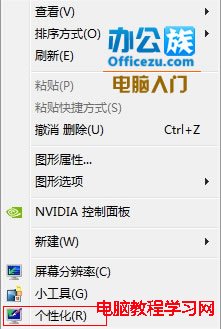
  1. 桌面右鍵 → 「個人化」 (部分版本無此項,請升級旗艦版或改用控制台「更換桌面背景」)。
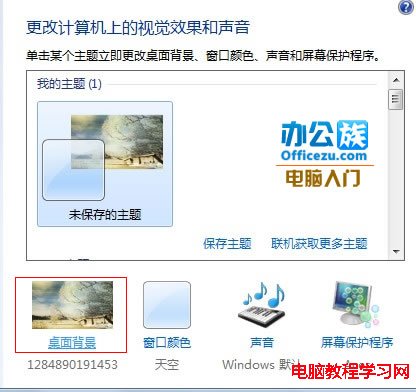
  2. 點擊下方「桌面背景」。
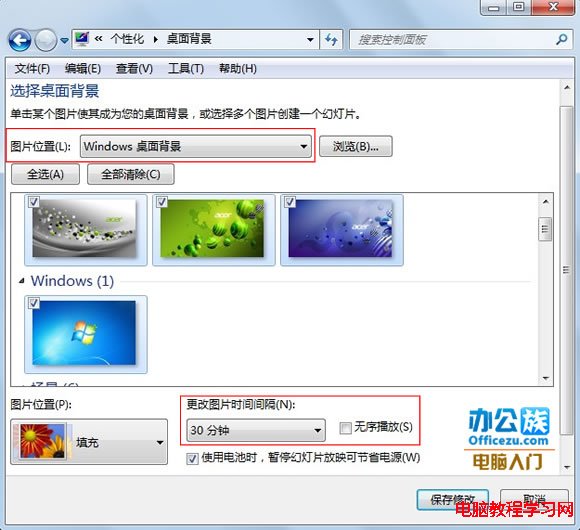
  3. 「圖片位置」瀏覽選取資料夾 → 畫面列出所有圖片。
  4. 靜態:單選一張 → 「儲存變更」。
    動態輪播:多選 (Ctrl+點擊) 或全選 → 「圖片位置」選「填滿」→ 「更換圖片間隔」設定 (10 秒~1 天) → 勾選「隨機播放」→ 「儲存變更」。

無需第三方軟體即可享受動態桌面,心情跟著圖片換裝。

Copyright © Windows教程網 All Rights Reserved