Windows 升級 (如 7→8、8→8.1、8.1→10) 後,C 槽會殘留 windows.old 資料夾 (舊系統備份),佔用數 GB 空間。透過內建「磁碟清理」可安全移除。
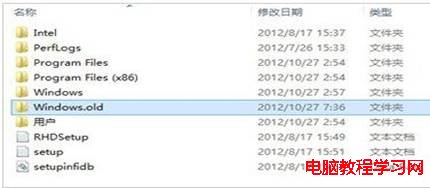
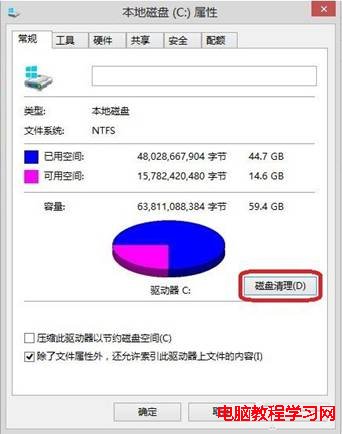
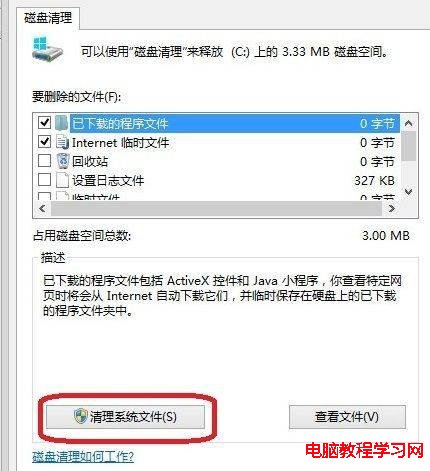
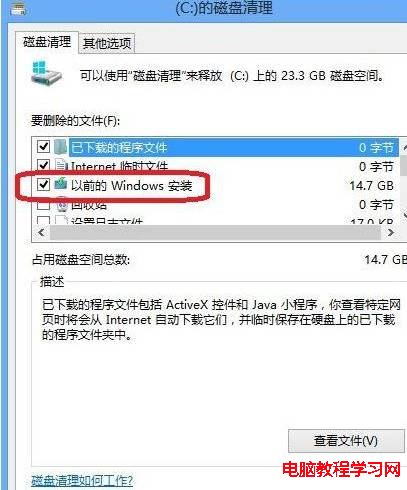
提醒:刪除後無法使用「回復到舊版 Windows」功能,確認新系統穩定後再執行。若磁碟清理找不到該選項,可嘗試以管理員身分執行 cleanmgr 或手動取得權限刪除資料夾。
Windows 7 安裝攝影機驅動程式出現「error launching installer」錯誤的解決方法
Windows 7 藍畫面錯誤代碼完整對照表 (0-105) 與排查三大原則
Windows 7 64位新增印表機完整圖文教學:裝置和印表機>新增本地/網路印表機、驅動載入、共用設定
Win7 工作列右下角三角形 (隱藏圖示) 不見了?取消「始終顯示所有圖示」即可找回
Win10 Build 10159 全新預設桌布「Hero」4K 高清下載:無數位建模渲染純拍攝
Windows 7 USB 隨身碟不顯示磁碟代號?磁碟管理手動指派代號解決