在開始畫面右鍵應用程式時,預設選單包含「解除安裝」選項,容易造成誤刪。透過群組原則可隱藏此選項,保護重要應用不被意外移除。
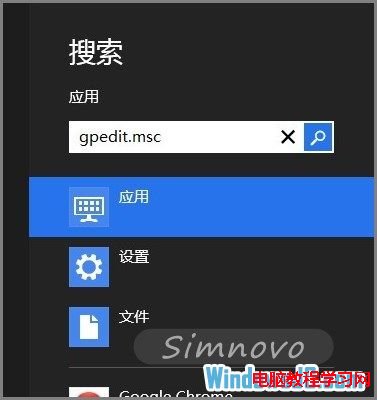
Charms 列搜尋 gpedit.msc 並開啟。
依序展開:使用者設定 → 系統管理範本 → 「開始」選單和工作列。
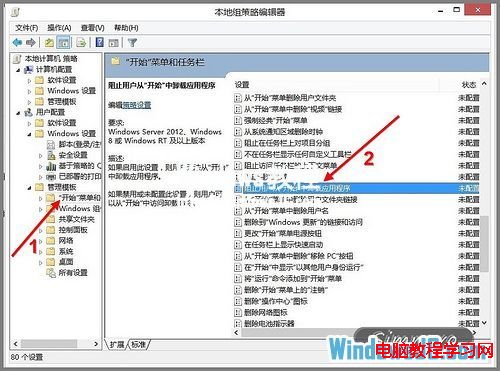
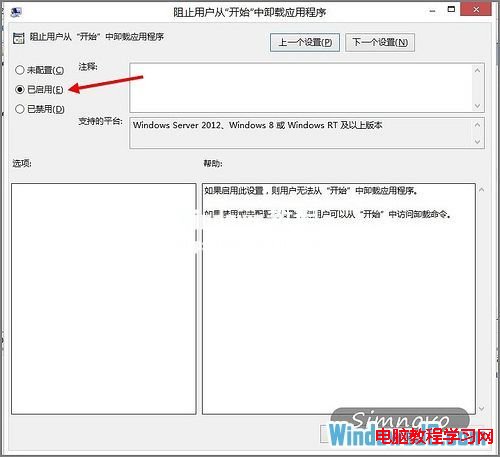
找到該項目 → 雙擊 → 選擇「已啟用」 → 套用/確定。
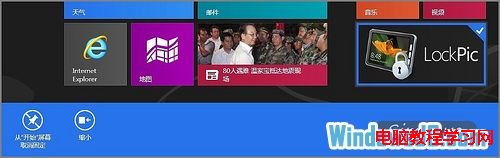
返回開始畫面右鍵任意應用,「解除安裝」選項已消失。
適用版本:Windows 8 專業版/企業版(家用版無群組原則編輯器)。
Win 10 正式版 10240 收到 KB3074683 安全更新內容匯總:修復控制台腳本、減少 OOBE 重啟
Win10 如何查看補丁是否更新到最新?設定頁面與版本號雙重驗證
Win7 英文輸入法不見了怎麼找回?控制台→區域與語言→鍵盤與語言→新增美式鍵盤並設為預設
Win10 Build 10125 動圖展示:開始菜單字母索引、任務欄垂直進度條
Win10 控制面板哪去了?已改名“设置”,开始菜单一键直达
Win10 Build 9860 升級操作流程:僅能透過 Modern 介面「更新與復原」→「預覽版本」→「立即檢查」取得