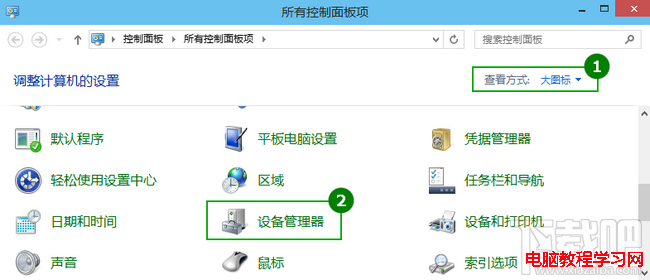
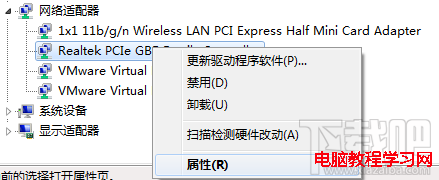
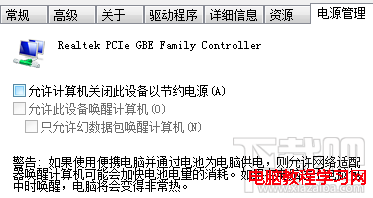
Win10 待機自動斷網影響下載/掛機?關閉網卡省電功能即可:
設定後待機保持網路連線,下載/掛機不中斷。
Win10 升級太慢?五個小技巧大幅加速
Word 技巧:批次刪除表格保留內容、防止破折號換行斷開
Win7 更新失敗提示「正在設定 Windows Update 失敗 還原變更」無法開機?三種解法:安全模式關閉更新、系統還原、耐心等待
PE 還原 Win7 系統報錯 Error Number: (19010)?四大核心原因與對策
Windows 7 刪除不需字體釋放資源:字型資料夾手動清理指南
Win10 如何恢復開始畫面 (全螢幕開始選單) 取代開始選單?工作列屬性一鍵切換
Windows 8 全面解析:Metro 介面、觸控優化、核心新特性與版本差異
Win10 累積更新 KB3200970 及 11 月各版本獨立安裝包 (MSU) 下載彙總