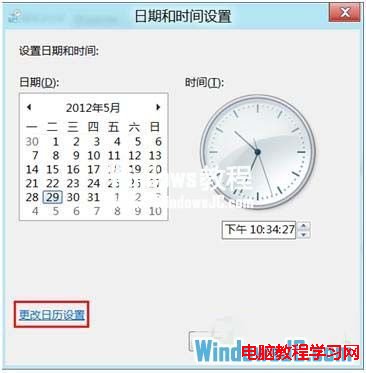
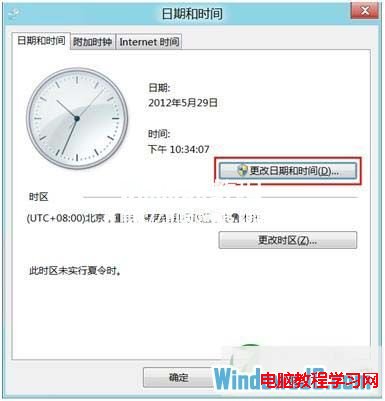
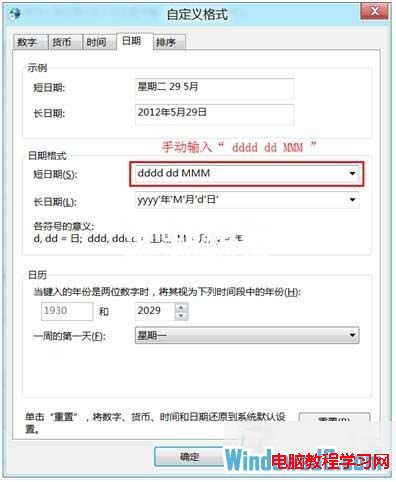
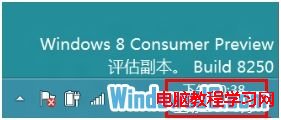
Windows 8 預設工作列時鐘僅顯示時間與日期,若想加上星期幾(如「星期一」),需自訂日期格式。
yyyy/MM/dd dddd
dddd dd MMM
格式代碼說明:dddd 顯示完整星期名稱,ddd 顯示縮寫。同樣方法適用於 Windows 7/10/11。
dddd
ddd
Win10 Mobile Redstone 更新新功能詳細介紹:UI 改版、應用漫遊與 Cortana 增強
騰訊電腦管家預約 Win10 升級圖文教學:輕鬆拿 QQ 等級加速 0.2 天/日
Win8.1 圖片資料夾顯示並依解析度排序
Windows XP/7/8 顯示隱藏檔案與系統隱藏檔案:資料夾選項設定圖文教學
Windows 10 發布會直播連結與時間:北京時間 1 月 22 日凌晨 1 點見證歷史時刻
Windows Hello 示範:Windows 10 生物辨識解鎖(指紋/臉部/虹膜)
解決 Windows 7 網路探索無法啟用、印表機共用失敗的完整指南
Windows 7 安裝飛信 2010 重複啟動報 USER32.dll 錯誤解決方案