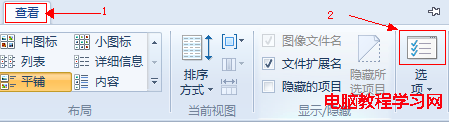
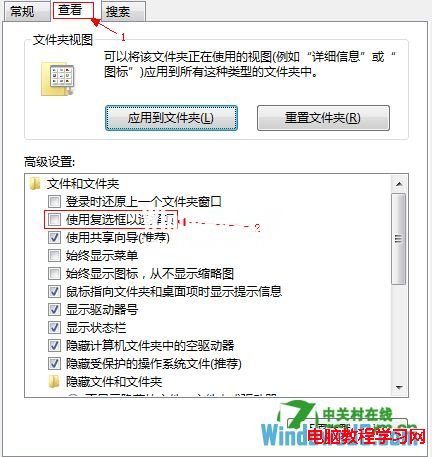
Win8 檔案總管預設需 Ctrl+點選多選,啟用「使用核取方塊選取項目」後,滑鼠游標移至檔案上方即出現核取方塊,單獨勾選更直覺。
Win10 Mobile 10586.242 累積更新上手視頻評測:Lumia 525 實測性能提升、電池續航明顯改善、多任務流暢
Win10 命令提示字元視窗如何設定半透明?屬性→色彩→不透明度 30%~100% 自由調整
Win8.1 提示「公用外殼 DLL 已停止運作」?啟用 UPnP Device Host 服務修復
微軟確認:Win10 Edge 瀏覽器將支持 WebM 視頻格式
Windows 10 預覽版應用商店 Beta 無法開啟或當機解決方案
Win10 Build 10049 新增 Bio Enrollment 應用:Windows Hello 生物辨識前置作業
Win10 設定 IE 啟動時自動開啟首頁教學
Win7 關閉「描述員」 (Narrator) 語音功能:輕鬆存取中心取消勾選即可