Win8/8.1 桌面捷徑預設有小箭頭覆蓋圖示,若想純淨顯示,可透過修改登錄表 Shell Icons 值 29 指向透明圖示資源 (imageres.dll,197) 並重建圖示快取達成。
@echo off
reg add "HKEY_LOCAL_MACHINE\SOFTWARE\Microsoft\Windows\CurrentVersion\Explorer\Shell Icons" /v 29 /d "%systemroot%\system32\imageres.dll,197" /t REG_SZ /f
taskkill /f /im explorer.exe
attrib -s -r -h "%userprofile%\AppData\Local\iconcache.db"
del "%userprofile%\AppData\Local\iconcache.db" /f /q
start explorer
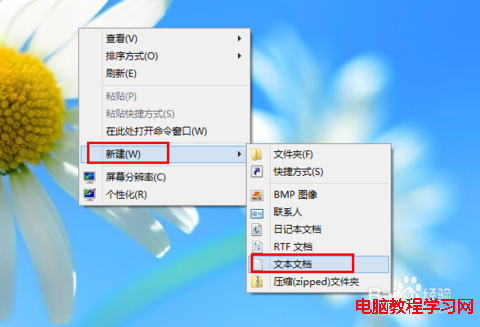
RemoveArrow.bat (類型選「所有檔案」)。@echo off
reg delete "HKEY_LOCAL_MACHINE\SOFTWARE\Microsoft\Windows\CurrentVersion\Explorer\Shell Icons" /v 29 /f
taskkill /f /im explorer.exe
attrib -s -r -h "%userprofile%\AppData\Local\iconcache.db"
del "%userprofile%\AppData\Local\iconcache.db" /f /q
start explorer
同樣以管理員身分執行即可恢復預設箭頭。
原理:
Shell Icons29 對應捷徑覆蓋圖示索引,imageres.dll,197為 1x1 透明圖示。刪除快取iconcache.db強制重建圖示資料庫。Win10/11 同樣適用。
XP 連線 VPN 錯誤 633「調變解調器已在使用」註冊表修復法
Windows 10 安裝 AutoCAD 2014 無法授權解決方案:關閉網路與 Defender、註冊機設相容模式、以管理員身分執行
Win10 10525 預覽版即將推送至 Insider 慢速通道:快速通道反饋良好,穩定性獲驗證
Win10 Build 9879 安裝體驗:白色背景介面更清爽
Win10 如何打造極致深色模式?六步驟「簡單粗暴」個人化教學:註冊表啟用隱藏黑色主題、關閉透明/強調色、控制台調整純黑、第三方工具鎖定登入畫面純黑、桌面純黑背景