Windows XP Windows 7 Windows 2003 Windows Vista Windows 綜合教學 Linux 系統教學
Windows 10 Windows 8 Windows 2008 Windows NT Windows Server 電腦軟體教學
您现在的位置: Windows教程網 >> Windows教程 >  >> Windows 綜合教學 >> 關於 Windows

Win10 自動更新設定位置與進階選項說明:無法直接關閉但可暫停延後

編輯:關於 Windows

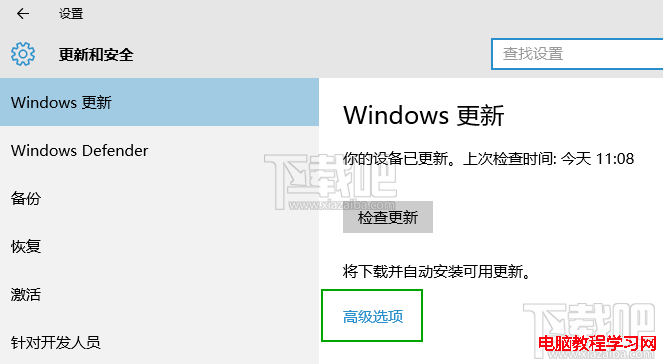
Windows 10 設定介面中自動更新選項位於「設定 → 更新與安全性 → Windows Update → 進階選項」,雖無「關閉」按鈕,但可設定暫停更新、延後功能更新、選擇更新通道等緩解頻繁重啟困擾。

進階選項可設定項目

  • 暫停更新: 最長暫停 35 天 (家用版) / 更久 (專業版+)。
  • 更新安裝時間: 設定作用中時段,避開工作時間自動重啟。
  • 延後功能更新: 專業版+ 可延後 365 天接收大版本更新。
  • 延後品質更新: 專業版+ 可延後 30 天接收累積更新。
  • 透過計量連線下載: 開啟可在 4G/流量計費網路下下載更新 (謹慎使用)。
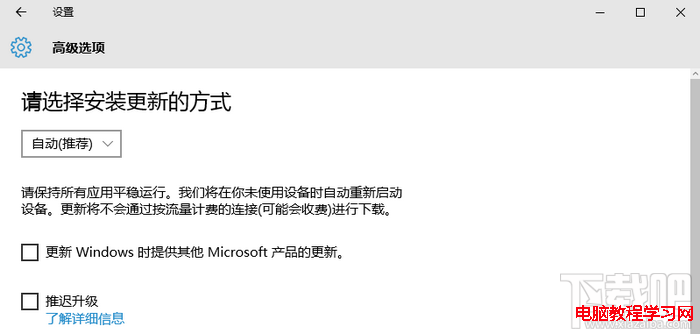
Windows Update 進階選項

暫停更新設定

如需徹底關閉: 請參考「Win10 關閉自動更新兩大法」使用群組原則或停用服務。

Copyright © Windows教程網 All Rights Reserved