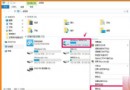
若先前已建立本機帳戶,第 4 步驟可直接填入現有帳戶資訊。
Win10 Mobile 10586.456 穩定預覽版截圖曝光:藍牙功能存缺陷導致螢幕無回應
Win7 建立桌面休眠捷徑教學:一鍵/熱鍵快速進入休眠
Win7 玩單機遊戲提示缺少 steam_api.dll?Windows Defender 誤刪為主因,關閉即時防護並從解壓包/破解補丁補回
Win7 整理磁碟提示「檢查無法執行」解法:安全模式下執行 chkdsk /f /r
Win 10 版本號如何查看?dxdiag 指令快速檢視
Windows 10 Build 10074 首枚累積更新 KB3061161 釋出:修復 Cortana 無法開啟、錯誤報告上傳失敗等七大問題
Win10 安裝杜比音效 Dolby V4.1 進階教學:群組原則控制驅動簽名與安裝順序
Win7 使用本機群組原則讓任意程式、文件、網頁開機自動執行