Windows XP Windows 7 Windows 2003 Windows Vista Windows 綜合教學 Linux 系統教學
Windows 10 Windows 8 Windows 2008 Windows NT Windows Server 電腦軟體教學
您现在的位置: Windows教程網 >> Windows教程 >  >> Windows 綜合教學 >> 關於 Windows

Win10 隱藏桌面圖示兩招:一鍵全隱或單獨隱藏系統圖示

編輯:關於 Windows

桌面圖示過多不僅凌亂,還干擾視線。Windows 10 提供兩種隱藏方式,依需求選擇。

方法一:一鍵隱藏所有桌面圖示

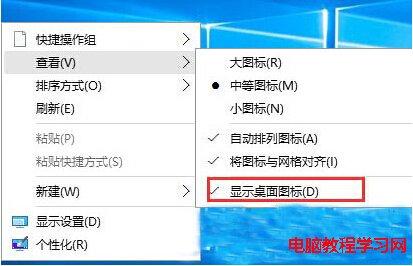
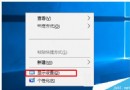
  1. 桌面空白處右鍵 → 「檢視」。
  2. 取消勾選「顯示桌面圖示」。

所有捷徑、檔案、資料夾圖示瞬間消失,再次勾選即恢復。

方法二:單獨隱藏系統圖示(此電腦、回收站、網路等)

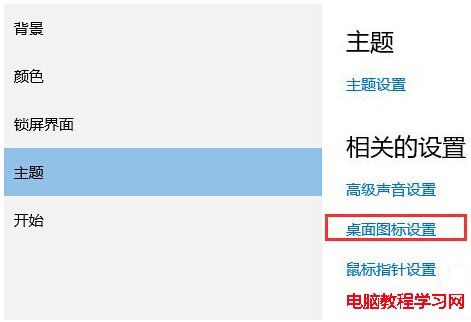
  1. 桌面空白處右鍵 → 「個人化」→ 左側「主題」→「桌面圖示設定」。
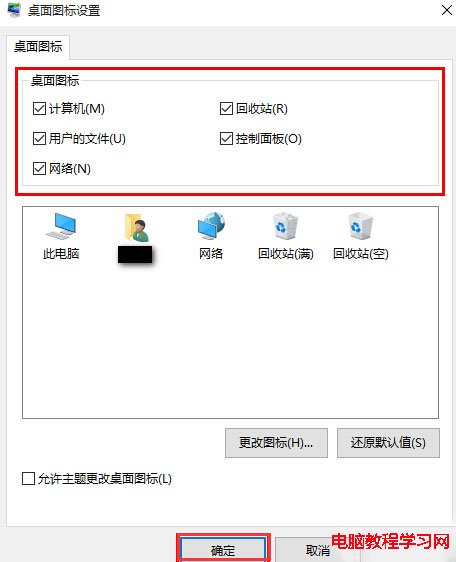
  2. 在「桌面圖示」區塊,取消勾選不想顯示的系統圖示(如「控制台」、「網路」),確定。

此法僅影響系統預設圖示,使用者建立的捷徑與檔案不受影響,適合只想簡化桌面而保留工作檔案的使用者。

Copyright © Windows教程網 All Rights Reserved