Windows XP Windows 7 Windows 2003 Windows Vista Windows 綜合教學 Linux 系統教學
Windows 10 Windows 8 Windows 2008 Windows NT Windows Server 電腦軟體教學
您现在的位置: Windows教程網 >> Windows教程 >  >> Windows 綜合教學 >> 關於 Windows

遊戲啟動提示「缺少 xinput1_3.dll」解決:安裝 DirectX 或補回 DLL

編輯:關於 Windows

執行《極品飛車》、《孤島危機》等 3D 遊戲時出現「缺少 xinput1_3.dll」,因缺少 DirectX 執行元件。xinput1_3.dll 為 DirectX 輸入控制模組,位於 C:\Windows\System32。

解決方法

  1. 安裝完整 DirectX(推薦):
    Windows XP 裝 DirectX 9.0c,Windows 7/8/10 裝 DirectX 11/12(含運行時)。官方下載中心可取得「DirectX 最终用户运行时 Web 安裝程式」,會自動補齊所有缺失元件。
  2. 單獨補 DLL(不建議):
    下載 xinput1_3.dll 放入 C:\Windows\System32,再以管理員身分執行 regsvr32 xinput1_3.dll 註冊。但缺一個 DLL 通常代表整組 DirectX 不完整,單補治標不治本。
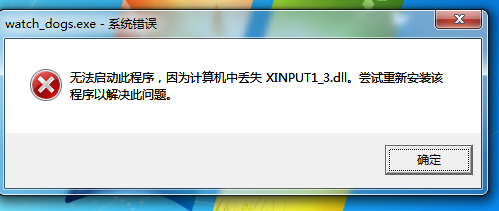
缺少 xinput1_3.dll 錯誤訊息

最佳做法:直接重新安裝最新版 DirectX 運行時,徹底解決所有相關 DLL 缺失問題。

Copyright © Windows教程網 All Rights Reserved