Windows XP Windows 7 Windows 2003 Windows Vista Windows 綜合教學 Linux 系統教學
Windows 10 Windows 8 Windows 2008 Windows NT Windows Server 電腦軟體教學
您现在的位置: Windows教程網 >> Windows教程 >  >> Windows 綜合教學 >> 關於 Windows

Win7 查看 IP 路由表完整指令:route print 使用教學

編輯:關於 Windows

有時候我們需要檢視本機完整的 IP 路由表資訊,以排查網路連線問題或設定靜態路由。Windows 內建的 route print 指令能一次顯示所有路由項目,操作簡單快速。以下為您整理完整操作步驟。

操作步驟

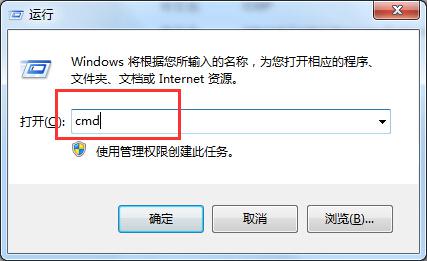
  1. 按 Win + R 開啟「執行」視窗,輸入 CMD 並按 Enter,開啟命令提示字元視窗。
    開啟 CMD 視窗
  2. 在命令提示字元中輸入 route print 並按 Enter,螢幕即會列出完整的 IP 路由表資訊,包含網路目的地、網路遮罩、閘道、介面、度量等欄位。
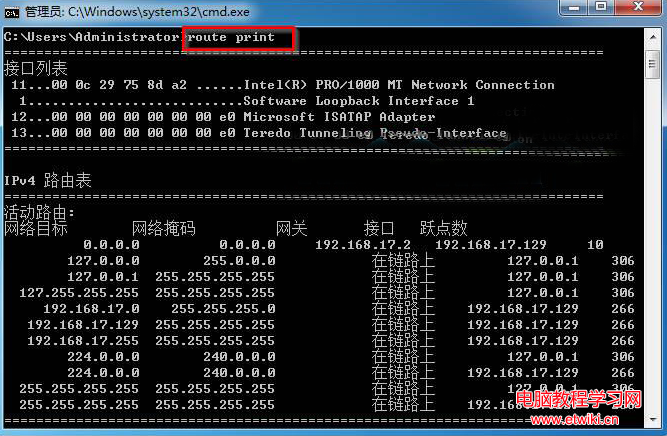
    route print 輸出範例

進階用法:篩選特定網段路由

若只想查看特定網段(例如 192.168.x.x 或 10.x.x.x)的路由資訊,可搭配萬用字元:

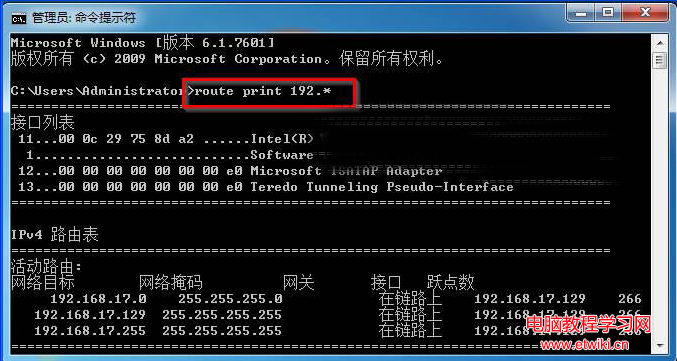
route print 192.*

執行後將只顯示以 192 開頭的路由條目,方便快速定位內網路由設定。
route print 192.* 篩選結果

常見欄位說明

  • Network Destination:目標網路位址
  • Netmask:子網路遮罩
  • Gateway:下一跳閘道 IP
  • Interface:本機網卡介面 IP
  • Metric:路由成本度量,數值越小優先級越高

提示:若需新增/刪除靜態路由,可使用 route add、route delete 指令,並加上 -p 參數使其永久生效(重開機不消失)。

Copyright © Windows教程網 All Rights Reserved