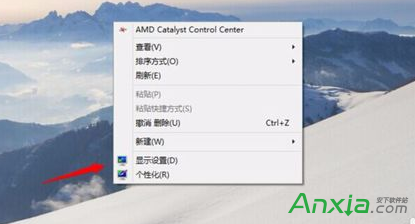
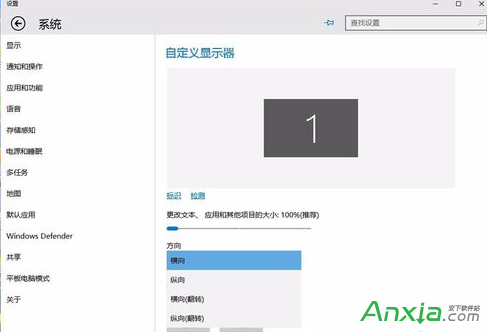
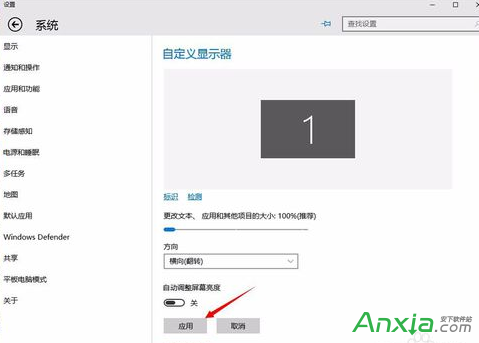
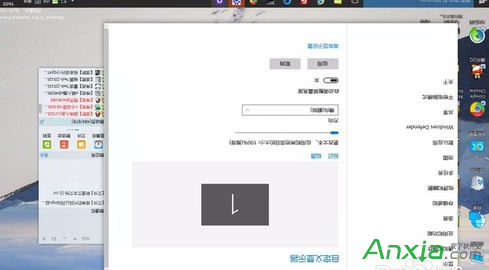
工程師、設計師常需將螢幕旋轉 90°/180°/270° 以利閱覽長程式碼、排版。Win10 內建旋轉功能:桌面右鍵 →「顯示設定」→「方向」選擇「橫向/直向/橫向(翻轉)/直向(翻轉)」→「套用」即時生效。
部分顯示卡驅動支援熱鍵:Ctrl+Alt+方向鍵 可快速旋轉(需驅動支援)。
Windows 8 啟用 Hyper-V 虛擬化平台:控制台開啟 Windows 功能即可使用
Win10 10061 隱私權設定新增「無線模組」、「帳戶資訊」、「訊息」三大項:詳細圖文解析
Win10 無法開啟 .exe/.chm 電子書?解除鎖定、檢查路徑特殊字元、7-Zip 解壓替代方案
盜版 Windows 用 360/騰訊/官方升級 Win10 真的能洗白嗎?實測三種方式激活情況
Windows 7 建立寬頻撥號連線 (PPPoE) 完整圖文教學
Win10 专业版 N 是什么?欧洲反垄断版,移除 Windows Media Player