透過刪除系統檔案停用 Cortana (不建議一般使用者操作)
此方法為強制刪除 Cortana 核心檔案,會永久移除小娜功能,且可能影響系統更新或搜尋功能。僅供進階使用者參考,操作前請備份系統。
操作步驟
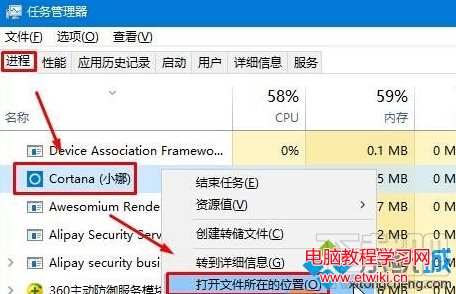
- 按 Ctrl+Shift+Esc 開啟「工作管理員」,「詳細資料」頁籤找到「Cortana」,右鍵選「開啟檔案位置」。
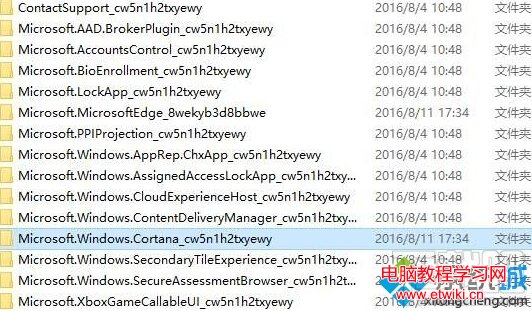
- 進入
Microsoft.Windows.Cortana_cw5n1h2txyewy 資料夾。
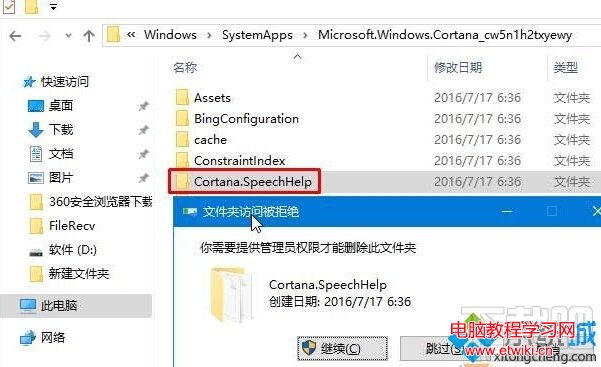
- 刪除其中的
SearchUI.exe 與 Cortana.SpeechHelp 資料夾。
替代方案 (較安全)
- 設定 → 隱私權 → 語音、墨跡輸入和輸入個人化 → 關閉「讓我使用語音指令」。
- 設定 → Cortana → 關閉「Cortana 可以給你建議...」等所有開關。
- 使用群組原則 (Pro/Enterprise 版) 或登錄完全停用 Cortana。