Win7 偶發「記憶體不足」彈窗卻發現實體記憶體充足,通常是虛擬記憶體 (分頁檔) 設為固定值過小或手動停用導致。啟用「自動管理」讓系統動態調整即可解決。
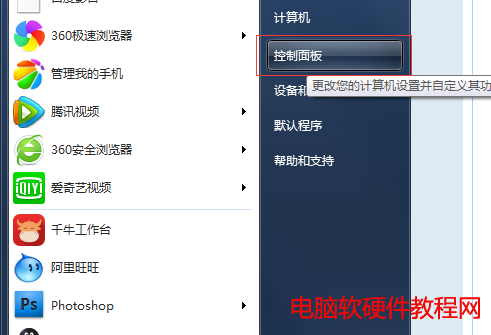
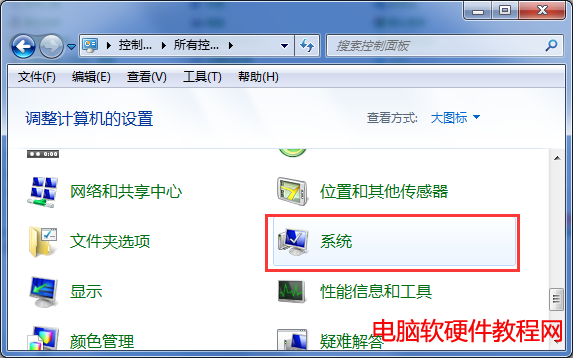
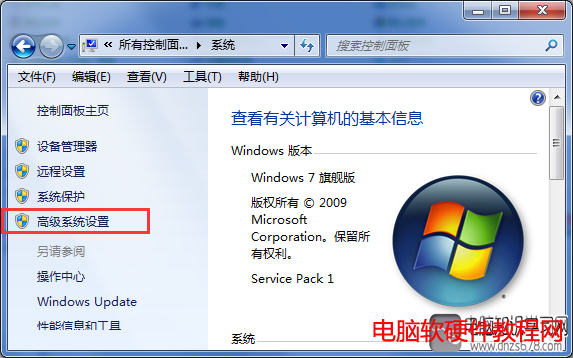
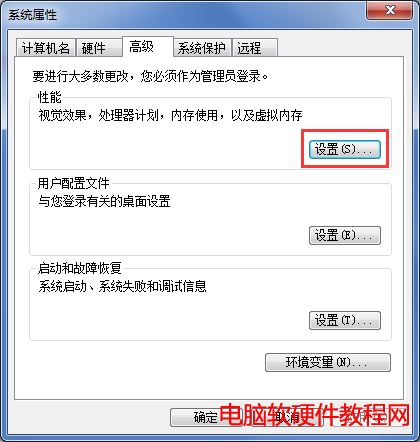
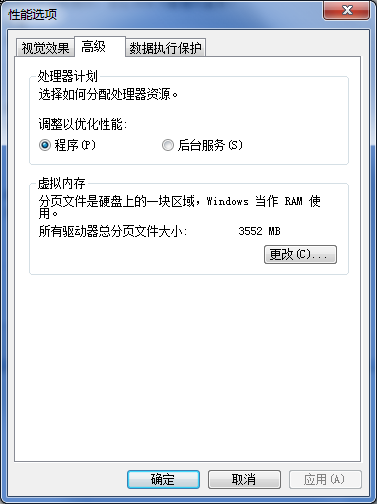
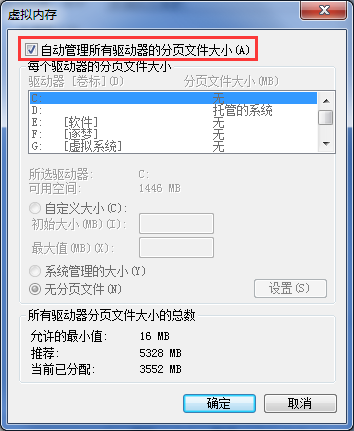
自動管理模式下,系統依實際記憶體壓力動態調整分頁檔大小,避免手動設定過小導致提交上限不足。大記憶體 (16GB+) 系統建議仍保留自動管理,勿完全停用虛擬記憶體。
Windows 8 移除「這台電腦」下的視訊、圖片、文件、下載等資料夾:登錄檔刪除命名空間
NVIDIA GeForce 355.80 熱修復驅動釋出:解決 SLI 多顯示器虛擬記憶體占用問題
Win7 自行優化開機速度:msconfig 縮短等待 + 啟用多核心引導
Win10 內建財經應用完整教學:即時股價、關注清單、多欄排版、股票查詢、財務計算機、全球市場動態
Win7/Win8.1 升級 Win10 後如何全新安裝?5 大注意事項:確認激活、正確 ISO、備份資料、USB 開機、聯網自動激活
Windows 7 關閉開始選單氣球提示 (InfoTip) 教學:群組原則一鍵禁用