Windows XP Windows 7 Windows 2003 Windows Vista Windows 綜合教學 Linux 系統教學
Windows 10 Windows 8 Windows 2008 Windows NT Windows Server 電腦軟體教學
您现在的位置: Windows教程網 >> Windows教程 >  >> Windows 綜合教學 >> 關於 Windows

升級 Windows 10 後 PS/2 鍵盤滑鼠失效?一條指令修復註冊表 UpperFilters

編輯:關於 Windows

部分台式機升級 Win 10 後 PS/2(圓孔)鍵盤/滑鼠無反應,GHOST 版亦可能發生。以系統管理員身分執行命令提示字元,寫入註冊表 UpperFilters 值即可修復,無需重灌系統。

修復指令

  1. 接上 USB 鍵盤/滑鼠暫時操作。
  2. Win+X → 「命令提示字元 (系統管理員)」。
  3. 輸入以下指令並按 Enter:
    reg add HKLM\SYSTEM\CurrentControlSet\Control\Class\{4D36E96B-E325-11CE-BFC1-08002BE10318} /v UpperFilters /t reg_multi_sz /d kbdclass /f
  4. 重新開機,PS/2 裝置恢復正常。

原理:補回鍵盤類別驅動的 UpperFilters 註冊表值,讓系統正確載入 PS/2 鍵盤驅動鏈。
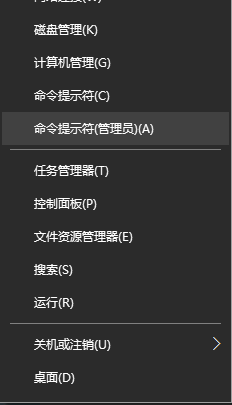
開啟管理員命令提示字元
執行 reg add 指令

Copyright © Windows教程網 All Rights Reserved