Win8 應用商店(Metro 應用)預設安裝至隱藏資料夾 C:\Program Files\WindowsApps,介面無法更改路徑。透過登錄修改 PackageRoot 可自訂安裝目錄,但需先取得註冊表權限。
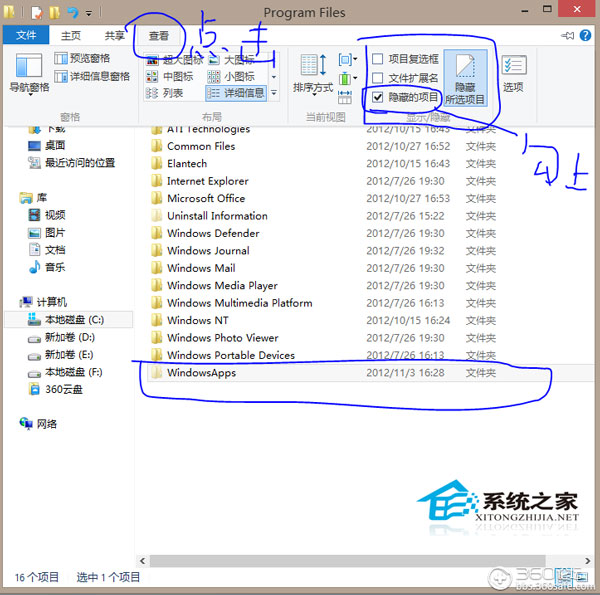
C:\Program Files\WindowsApps(隱藏資料夾,需開啟「隱藏項目」檢視)。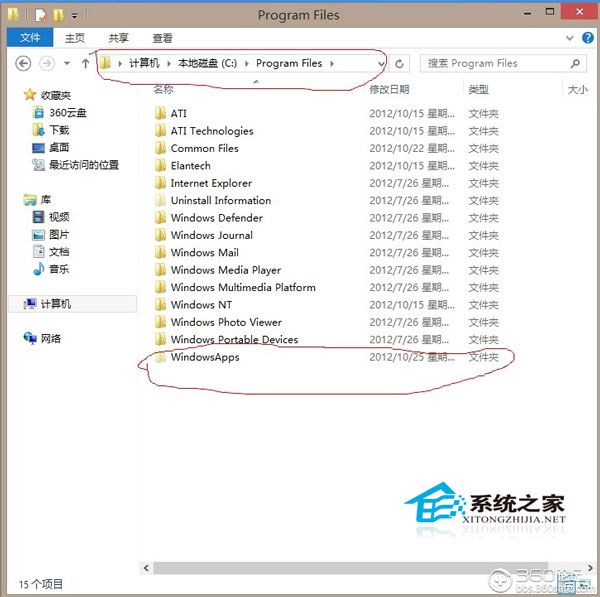
regedit → 定位 HKEY_LOCAL_MACHINE\SOFTWARE\Microsoft\Windows\CurrentVersion\Appx。Appx → 「權限」 → 選 TrustedInstaller → 「進階」 → 「變更」 → 「進階」 → 「立即尋找」 → 選目前登入用戶 → 確定層層返回。PackageRoot → 修改為自訂路徑(如 D:\WinApps)。WindowsApps 寬鬆,可能有安全性疑慮,建議參考原資料夾權限調整。此技巧可將 Metro 應用導向非系統盤,緩解 C 槽壓力,但操作涉及權限修改,請謹慎執行。
Windows 10 將推全域深色主題「夜間模式」,Edge 瀏覽器搶先展示
Win7 系統檔案誤刪怎麼救?兩大招:還原點還原、EasyRecovery 深度掃描救回檔案
Windows 7 新增網路印表機與 XP 差異大,必須透過電腦名稱或 IP 位址手動連線
Win7 網頁內容無法複製?Internet 選項停用腳本/小程式即時解決
Win10 標準帳號無法使用 Flash Player?改用管理員帳號暫時繞過,微軟或將徹底淘汰 Flash
Win7 關閉阿里旺旺自動登入/記住密碼:登入介面取消勾選兩選項即可