遭遇無法安裝修補程式,發現系統為 Windows Server 2008 R2 Pre-release 版本。重裝正式版需停機重裝應用,工作量極大;升級則僅需短暫維護窗口。升級前務必完成測試並準備回滾方案。
sources\cversion.ini。MinClient 值從預設 7601.0 修改為 7100.0(允許從 pre-release 升級)。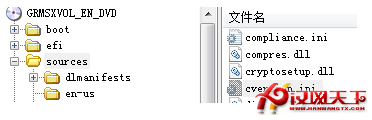
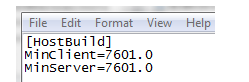
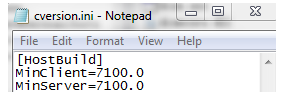
同樣方法適用於 Windows 7 RC 升級 RTM,參考:How to Upgrade the Windows 7 RC to RTM
Win8 大百科第 47 期:將標準帳戶提升為管理員權限完整指南
Win 10 週年更新導致 USB 攝影機故障?視訊編碼變更為主因,修正補丁陸續釋出
玩轉 Win8 高手必備:快速鍵應用大全含 IE10、檔案總管專屬熱鍵
Windows 8 建立圖片密碼:選圖繪製三組手勢(圓/線/點),觸控登入更直觀安全、可與密碼/PIN 共存切換
大爆料:Windows 8.1 重啟開始按鈕,支援「所有程式」模式與共用背景
Windows 8 操作要領完整指南:Charms 列、應用切換、分畫面、動態磚、Modern 應用視窗化