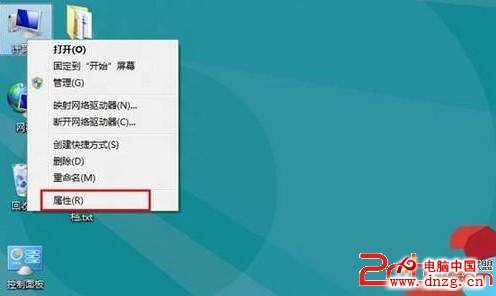
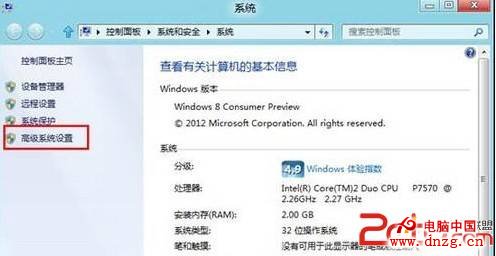
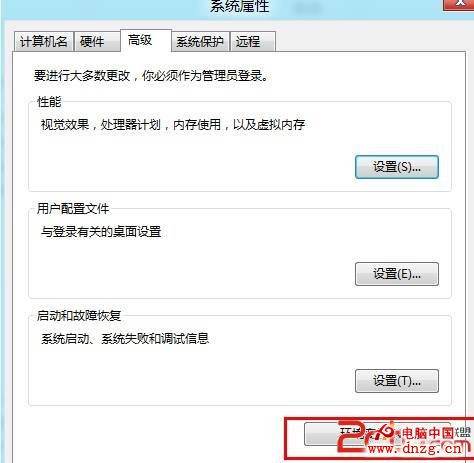
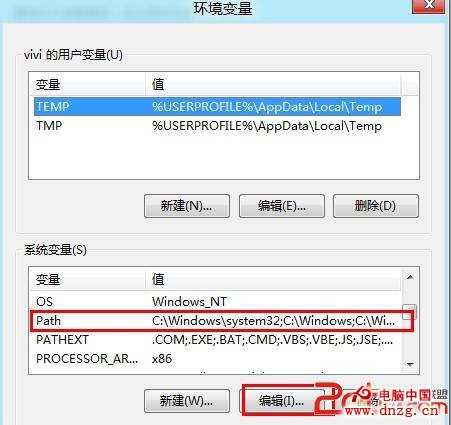
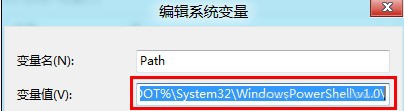
CMD 執行任何指令皆提示「不是內部或外部命令...」,主因 PATH 環境變數被軟體異常修改。修復步驟同文章 6605。
Path
%SystemRoot%\System32;%SystemRoot%\System32\WindowsPowerShell\v1.0
修復後 CMD 指令即可恢復正常運作。
WP 8.1 GDR2 升級教學:無法獲取 Win10 手機版的裝置替代方案
Windows 8 系統時間格式設定:24/12 小時制切換與時鐘圖示顯示控制
Windows 8 修改遠端桌面連接埠並正確設定防火牆規則
Win8 應用商店安裝卡在「掛起」無法完成?清除 SoftwareDistribution\Download 快取解決
Win10 待機喚醒 Wi-Fi 斷線 三大解決方案 (重複條目完整版)
Windows 8/8.1 清除 Windows Store 快取修復應用商店異常:wsreset.exe 一鍵重置
Win10 應用商店下載的應用安裝在哪裡?隱藏資料夾 WindowsApps 位置與權限獲取
Win8 大百科第 62 期:手動配置電源計劃,讓待機更持久