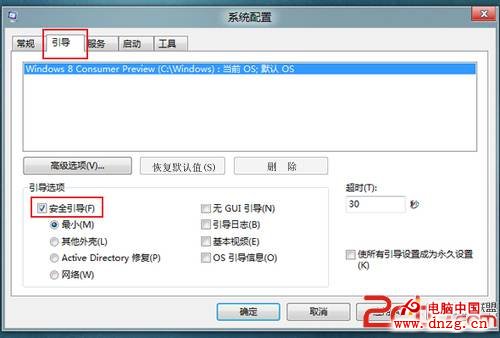
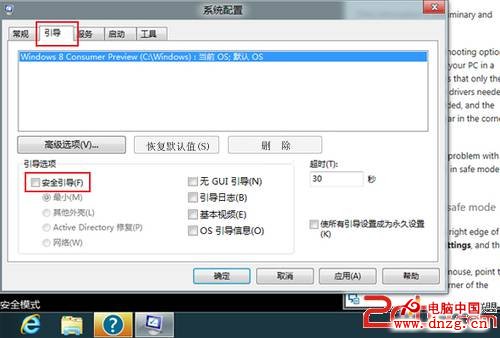
Win8 無一鍵 F8 進入安全模式,需在系統內透過 msconfig 設定。
msconfig
注意:安全模式下若不取消勾選,每次開機都會進入安全模式。
Windows 10 安裝 Windows 8.1 雙系統完整教學(USB 啟動 + UEFI/BIOS 相容)
記憶體異常故障六大類型與解決方案:從接觸不良到病毒修改 CMOS 完整排查
善用 Win8 行動中心:筆電平板辦公效率倍增器
Mac 上用 VirtualBox 安裝 Windows 10 完整圖文教學
Windows 8.1 深度整合 Skype,Messaging 應用程式將被取代
Win8 桌面與開始畫面加入一鍵關機按鈕教學
Win8 上市初期銷量不及預期:廠商產品缺乏亮點、Pro/RT 定位模糊、零售鋪貨延至明年 1 月
Windows 8「檔案歷程記錄」:你的個人檔案時光機,外接磁碟/網路位置自動版本備份與還原