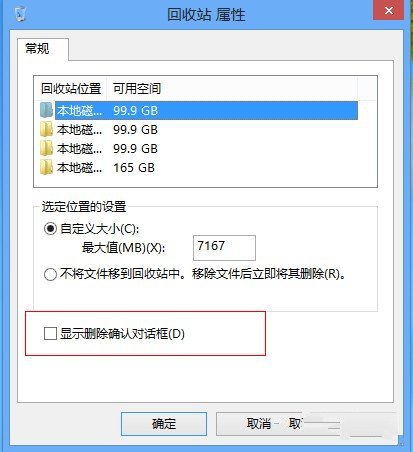
Win8 預設刪除檔案不再跳出確認視窗,直接移至資源回收筒,易造成誤刪。只需在資源回收筒屬性中啟用確認提示即可找回保護機制。
之後每次刪除檔案都會跳出「確定要移動這個檔案到資源回收筒嗎?」視窗,大幅降低誤刪風險。
Windows 8 憑證管理器完整指南:Web 憑證與 Windows 憑證備份/還原/同步
Windows 8.1 開機直接進入桌面兩種設定法
安裝 Win7 64位與 Win8 系統常見問題彙整:分區合併、UEFI/MBR 引導選擇
有產品金鑰如何將盜版 Win8 升級為正版?完整教學
Windows 8 VPN 連線屬性設定:右鍵網路圖示三步驟快速進入
Win8 內建還原重裝工具詳解:無需第三方軟件輕鬆救系統
Windows 10 Intel 第六代核顯驅動問題導致藍屏/黑屏?官方新版驅動修復教學
Windows 8.1 Update 實用技巧:自動登入與 IE11 企業模式啟用