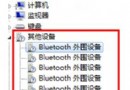
Windows 8 下 Chrome 瀏覽器遇到網站無法上傳附件、彈不出檔案選擇視窗、線上影片無法播放,主因是 Chrome 內建 Flash Player (PepperFlash) 與系統層級 Flash 衝突。停用內建元件並更新系統 Flash 即可修復。
chrome://plugins/,找到 Flash (2 files),點擊「停用」內建元件(通常位於 Chrome 程式資料夾下的 gcswf32.dll)。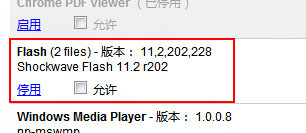
gcswf32.dll 檔案(如 C:\Program Files (x86)\Google\Chrome\Application\版本號\),徹底移除內建衝突模組。重新啟動 Chrome,造訪先前有問題的網站,上傳附件、影片播放應恢復正常。此法經實測有效,非 Chrome 本身缺陷,乃 Flash 雙版本衝突所致。