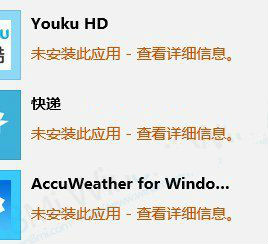
當在 Windows 應用商店安裝應用程式時,若出現「未安裝此應用程式 - 請再試一次,錯誤代碼:0x80073cf9」,通常是因為清理軟體誤刪了系統關鍵資料夾 C:\Windows\auinstallagent。
C:\Windows\auinstallagent
C:\Windows
auinstallagent
電腦常識:應用商店錯誤代碼 0x80073cf9
這是一個已知問題,重建該資料夾即可恢復應用商店正常安裝功能,無需重裝系統或複雜指令。
Win8.1 安裝更新後視窗切換變卡?罪魁禍首是 KB3033889
Windows 8 應用程式相容性問題 10 大解決方案:從虛擬機到相容性疑難排解
Win8 家庭版缺少群組原則?升級專業/企業版才能使用
Windows 8 64 位元安裝 Office 2010 32 位元錯誤 2705 解決:安裝 KB2680376 更新修復字型衝突
Win8.1 應用程式商店搜尋不到應用?關閉語言篩選或改區域為美國
Win8 啟動項管理搬家到工作管理器:啟動影響評估、禁用高影響程式加速開機
Windows 8 內建 SkyDrive 雲端硬碟完整操作指南
Win8 自動斷網解決方案:修改寬帶連線閒置逾時設定