透過「電腦管理」將非必要系統服務從「自動」改為「手動」,可減少開機負擔提升效能,且不影響需要時的正常啟動。
進入服務管理介面
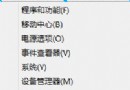
- Win + X →「電腦管理」,或檔案總管右鍵「電腦」→「管理」。
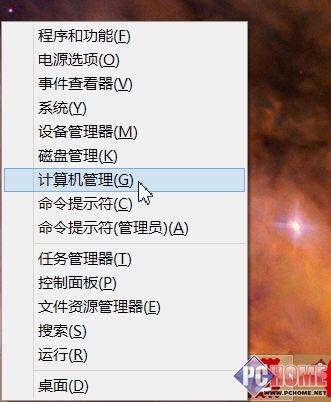
進入電腦管理視窗
- 左側展開「服務與應用程式」→「服務」。
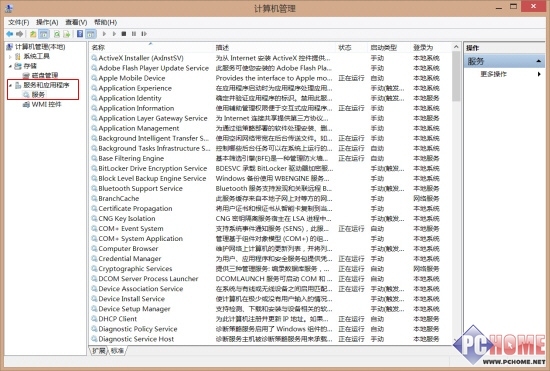
展開服務清單
修改啟動類型為手動
雙擊服務名稱,將「啟動類型」下拉選單改為「手動」。
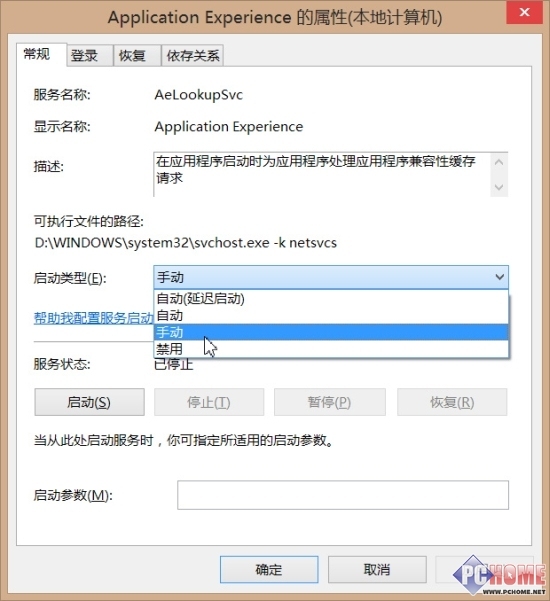
更改為手動啟動
可安全設為手動的 18 項服務
- Application Experience、Computer Browser、Diagnostic Policy Service、Distributed Link Tracking Client、IP Helper、Offline Files、Program Compatibility Assistant Service、Portable Device Enumerator Service、Print Spooler(無印表機可停用)、Remote Registry(建議停用)、Secondary Logon(改手動,停用影響遊戲)、Security Center、Server(單機可手動)、TCP/IP NetBIOS Helper(非工作群組可手動)、Windows Error Reporting Service、Windows Image Acquisition (WIA)、Windows Search(少用內建搜尋可手動)、Windows Time。
修改後若系統或軟體異常,請還原設定。建議逐項測試,確保穩定。