Win8 瀏覽圖片/影片縮圖異常,通常為快取檔損壞,兩種重建法:
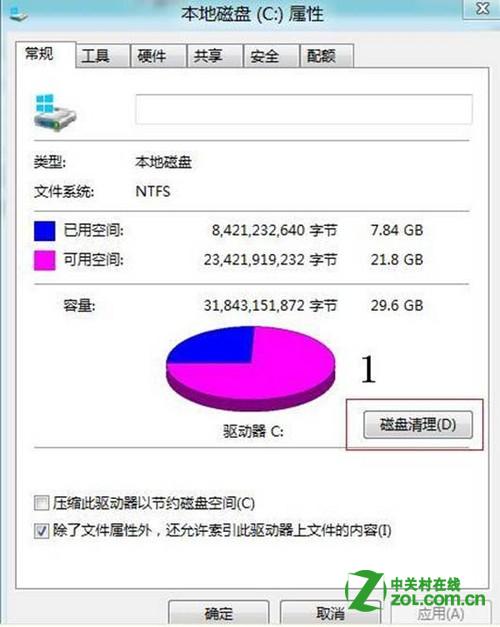
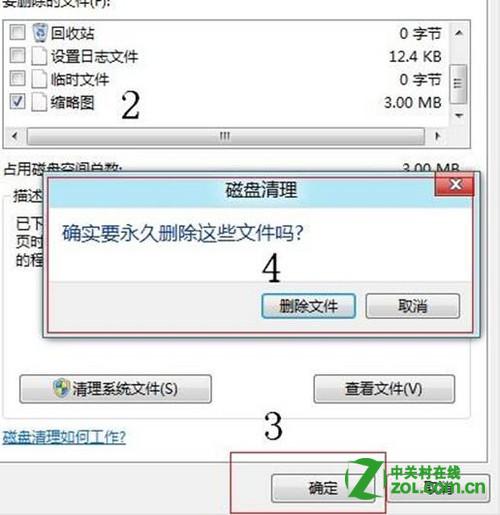
%USERPROFILE%\AppData\Local\Microsoft\Windows\Explorer → Enterthumbcache_32.dbthumbcache_96.dbthumbcache_256.dbthumbcache_1024.db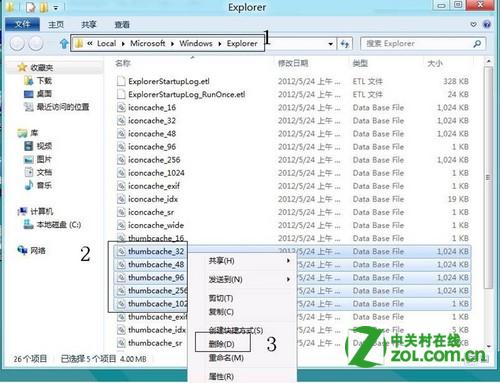
清除後重新開啟檔案,縮圖應恢復正常。
Windows 8 使用者名稱、Microsoft ID、管理員帳戶、電腦名稱四大身分識別詳細解析
Windows 8 內建壓縮/解壓縮工具:右鍵選單「傳送到壓縮資料夾」與「全部解壓縮」
Win8 進入安全模式新方法:魔方優化大師新增開機選單 + msconfig 設定
Win8 命令列設定定時關機:Shutdown 與 AT 指令兩種方法
16 個你可能不知道的 Win 8.1 隱藏技巧:重裝自動還原應用、Metro 真關機、鎖屏拍照、數字鍵盤當滑鼠...
Windows 8 調整「通知」資訊顯示時間:透過輕鬆使用中心設定