Windows XP Windows 7 Windows 2003 Windows Vista Windows 綜合教學 Linux 系統教學
Windows 10 Windows 8 Windows 2008 Windows NT Windows Server 電腦軟體教學

Win8 命令列設定定時關機:Shutdown 與 AT 指令兩種方法

編輯:Win8 系統應用技巧

Windows 8 內建命令列工具可設定定時關機,無需安裝第三方軟體。提供兩種常用指令方式。

方法一:Shutdown 指令 (倒數計時)

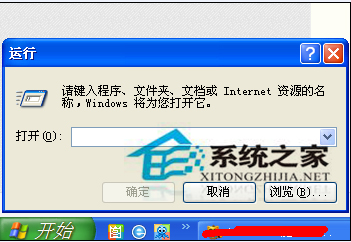
  1. Win+R → 輸入:shutdown.exe -s -t 3600
  2. 3600 = 秒數 (1 小時 = 3600 秒),可自行換算
  3. 系統將在倒數結束前 30 秒提示,隨後自動關機

執行 shutdown 定時關機

方法二:AT 指令 (指定時刻)

  1. Win+R → 輸入:at 24:00 shutdown -s
  2. 24:00 = 24 小時制時刻 (午夜 00:00)
  3. 系統在指定時刻前 30 秒提示,隨後關機

取消已排程關機

  • shutdown -a (中止 shutdown 指令排程)
  • at /delete /yes (刪除所有 AT 排程工作)

進階應用

  • 建立批次檔 timer_shutdown.bat:@echo off & set /p mins=輸入分鐘數: & shutdown -s -t %mins%*60
  • 工作排程器建立每日/每週定時關機任務 (更可靠、可管理)
  • 遠端關機:shutdown /m \\目標電腦名稱 /s /t 60 /c "系統維護即將關機"

注意

  • at 指令需「排程器」服務啟動 (預設自動)
  • 未儲存工作會強制關閉導致資料遺失,請確認已存檔
  • Windows 10/11 同樣支援此指令
Copyright © Windows教程網 All Rights Reserved