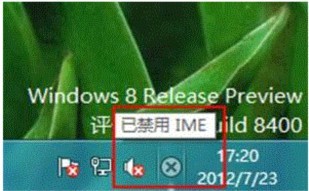
Windows 8 系統在一段時間未使用輸入法,或滑鼠游標位於無法輸入文字的位置時,會自動停用 IME (Input Method Editor,輸入法編輯器),工作列右下角出現小叉叉提示「已停用 IME」。當需要輸入文字時,Windows 8 會自動喚醒 IME。
此為 Windows 8 正常行為,非錯誤訊息,無需特別處理。
Windows 8 開啟檔案歷程記錄自動備份:四步驟設定保護重要資料
Windows 7/8/8.1 緊急重新開機熱鍵
Win8.1 Runtime Broker 行程介紹:Modern 應用權限管理核心程序,不可隨意停用
Win8.1 關閉自動維護功能:透過工作排程器停用 Idle Maintenance
破解 Windows 8 解析度過低無法執行 Metro 應用程式限制
Windows 8.1 Build 9374 洩露新功能:Kiosk 模式鎖定單一應用,適合零售展示與企業專用部署
識別可信任網站完整指南:HTTPS、憑證、EV 憑證、信任標章、隱私權聲明、詐騙特徵辨識
Win8.1 SkyDrive 設定為「離線可用」:避免大檔案臨時下載等待