Chrome 更新後版本號變更,導致註冊表中 `ChromeHTML` 關聯與 `DelegateExecute` CLSID 指向的舊版本路徑失效,啟動時彈出「chrome.exe - 沒有註冊類」。
HKEY_LOCAL_MACHINE\SOFTWARE\Classes\ChromeHTML\shell\open\command:預設值路徑中的版本號。HKEY_LOCAL_MACHINE\SOFTWARE\Classes\Wow6432Node\CLSID\{5C65F4B0-3651-4514-B207-D10CB699B14B}\LocalServer32:預設值與 `ServerExecutable` 路徑中的版本號。HKEY_CLASSES_ROOT\ChromeHTML\shell\open\command 下的 `DelegateExecute` 值。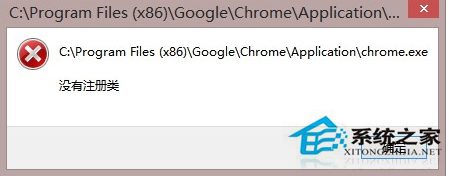
Chrome 內建修復功能:在網址列輸入 chrome://settings/resetProfileSettings 重設設定檔,或直接重新安裝 Chrome (保留書籤/密碼),安裝程式會自動修正註冊表關聯。