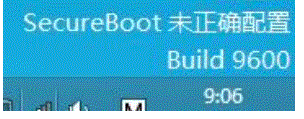
故障現象:升級 Win8.1 後,桌面右下角出現水印提示「SecureBoot 未正確配置」。
原因分析:Windows 8 引入 Secure Boot(安全開機)技術。Win8.1 會自動檢測是否啟用,若 BIOS 中未開啟則顯示此提示。
參考聯想筆電知識庫編號 106425 具體操作步驟。
下載並安裝 KB2902864,可直接關閉右下角水印提示,無需進入 BIOS 設定。適合不熟悉 BIOS 操作或不想折騰的使用者。
Windows 8.1 設定永不睡眠/待機:下載/掛機不中斷
Windows 8 啟用指派存取 (Kiosk 模式):限制標準帳戶僅能使用單一應用程式
Win8 無線網路受限無法上網?關閉網卡省電功能解決連線不穩
Win8 內建天氣應用程式無法使用?改裝「中國天氣通」替代方案
Win8 如何查看 IP 位址?兩種常用方法圖解
Win8 如何設定資料夾為「唯讀」或「系統」屬性?attrib 指令法
Windows 8 安裝後無法上網:重新安裝網卡驅動程式解決
Win8 瀏覽器一鍵翻譯英文網頁:百度瀏覽器安裝「百度翻譯 Pro」擴充功能