Windows 8.1 內建類似 iOS 的「滑動關機」功能,但隱藏在系統資料夾深處,需手動啟用並建立捷徑才能便捷使用。
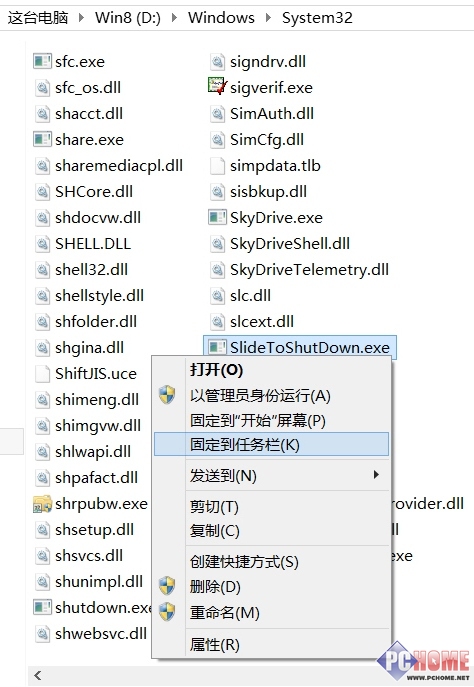
Windows\System32
SlideToShutDown.exe
找到 SlideToShutDown.exe 檔案
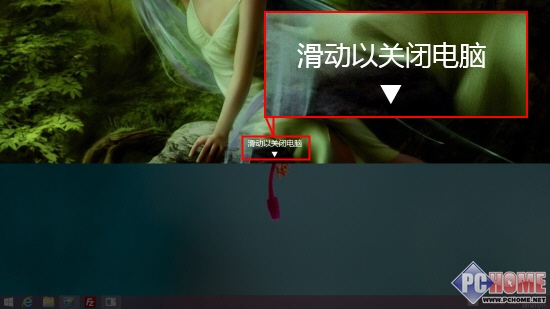
點擊捷徑後彈出百葉窗風格介面,向下滑動關機,向上滑動取消,極適合觸控螢幕裝置,是最直覺省事的關機方式。
向下滑動關閉電腦
也可透過 Win+R 輸入 slidetoshutdown.exe 直接執行,或建立桌面捷徑方便呼叫。
slidetoshutdown.exe
Win8.1 32位與64位系統深度對比選購指南
Windows 8 新浪新聞 HD:觸控優化的個性化閱讀體驗
Windows 8 隱藏功能啟用實驗:Paint Ribbon UI、エクスプローラ Ribbon、攝影機應用、任務管理員新介面
Win8.1 變更網路類型(公用/專用)圖文教學:透過電腦設定完成
Windows 8 关闭 UAC 同时保持 Metro 应用正常运行的组策略配置
Windows 8 開機自動進入傳統桌面設定教學:建立 .scf 快速捷徑並加入啟動資料夾
Win 8 自動修復失敗無法開機的安全模式系統還原解決法
Windows 8.1 鎖定畫面自訂神器 Lock Screen Customizer:幻燈片、語言、時間格式全搞定