現象:升級 Win8.1 後 C 槽空間暴減
透過 Windows Store 升級至 Win8.1 時,系統會自動將舊版系統檔案移至 C:\Windows.old 資料夾,佔用數 GB 至數十 GB 空間。確認新系統穩定後,可安全刪除以釋放空間。
正確刪除步驟(不可直接 Shift+Delete)
- 開啟「這台電腦」,右鍵 C 槽 →「內容」→「磁碟清理」。
- 點選「清理系統檔案」,掃描完成後勾選「以前的 Windows 安裝」與「暫存 Windows 安裝檔案」。
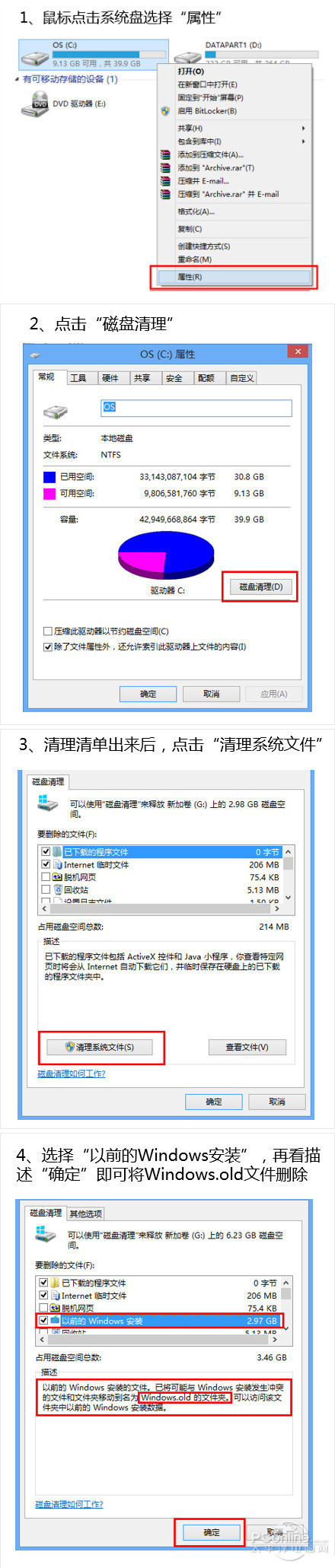
- 確定刪除,系統自動移除 Windows.old 及相關暫存檔。
注意事項
- 刪除後無法復原至舊版 Windows,請確認新系統驅動、軟體相容無誤再執行。
- 若磁碟清理找不到選項,可嘗試以系統管理員身分執行
cleanmgr 或使用第三方清理工具(如 CCleaner)。
結語
善用內建「磁碟清理」移除 Windows.old,是 Win8.1 升級後最安全、完整的 C 槽瘦身方式,避免手動刪除導致殘留檔案或權限錯誤。