Windows XP Windows 7 Windows 2003 Windows Vista Windows 綜合教學 Linux 系統教學
Windows 10 Windows 8 Windows 2008 Windows NT Windows Server 電腦軟體教學

Windows 8 免費升級 Windows 8.1 Update 完整圖文指南:一步到位

編輯:Win8 系統應用技巧

微軟釋出 Win8.1 Update 後,Windows 8 使用者可透過 Windows Store 免費直接升級至最新版本,過程將保留 Modern 應用與桌面程式。以下為官方升級流程詳解。
升級前置作業

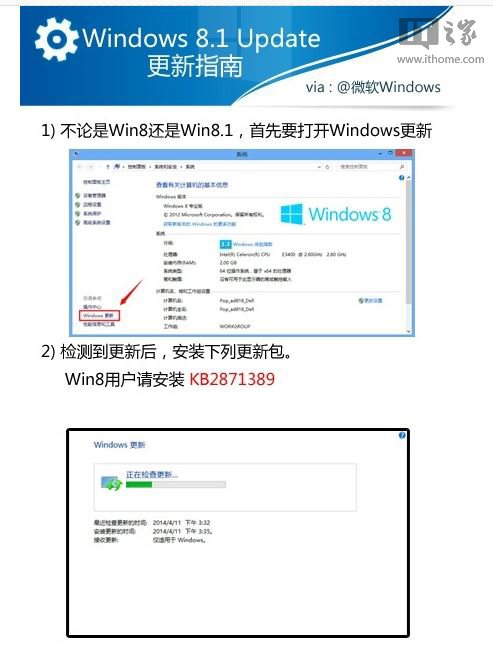
  1. 開啟「Windows Update」,確認已安裝 KB2871389 (Windows 8.1 升級先決條件)。若無,請透過 Windows Update 安裝或手動下載 (提供 32/64 位版本)。
    檢查 KB2871389

透過 Windows Store 升級

  1. 回到 Modern 開始畫面,開啟「Store」應用商店。首頁通常會自動顯示「免費升級至 Windows 8.1」橫幅,點擊進入。或在 IE10 網址列輸入 ms-windows-store:WindowsUpgrade 直接叫出升級頁面。
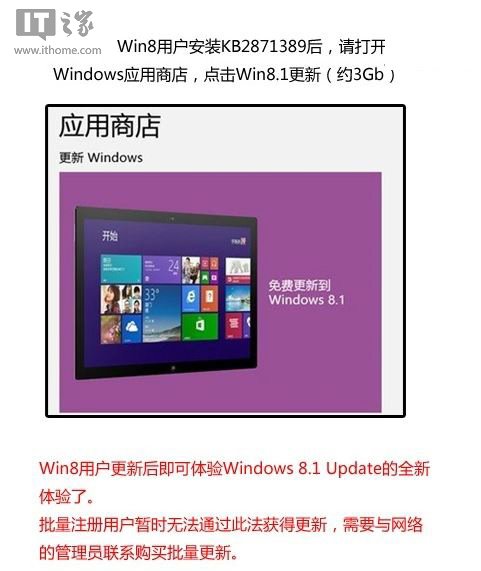
    Store 升級入口
  2. 選擇對應版本 (Windows 8.1 或 Windows 8.1 專業版) 開始下載。總下載量約 3 GB,視網路速度而定。
  3. 下載完成後自動安裝,過程中會重新啟動數次,請勿中斷電源。
  4. 安裝完成後,系統將提示重新啟動,進入 Win8.1 Update 桌面。
    升級完成保留應用提示

重要提醒

  • 升級過程會保留個人檔案、Modern 應用及多數桌面程式,但建議提前備份重要資料。
  • 升級後原 Windows 8 產品金鑰仍有效,無需重新輸入。
  • 若 Store 無顯示升級選項,請執行 wsreset.exe 重置 Store 快取,或檢查區域設定是否為支援地區。

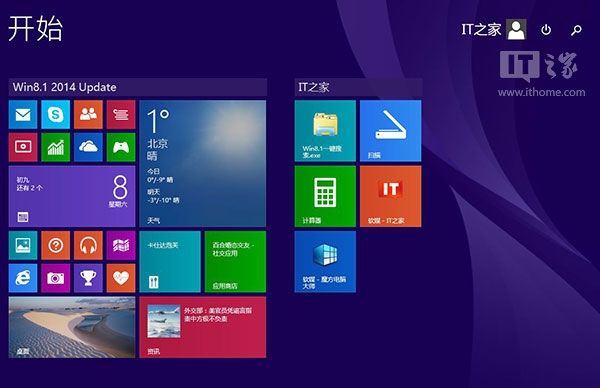
成功升級至 Win8.1 Update 正式版,享受開始按鈕回歸、搜尋/電源按鈕加入開始畫面等改進功能。

Copyright © Windows教程網 All Rights Reserved