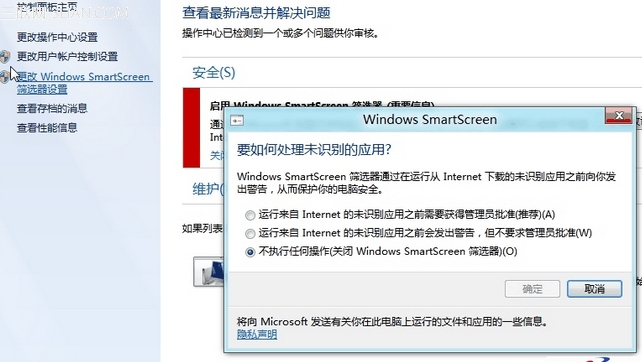
不想要 SmartScreen 干擾?
control.exe
設定即時生效,下載執行未簽名程式不再彈出攔截視窗。
修改 Win8 PE 系統屬性資訊教學:自訂電腦名稱、LOGO、OEM 資訊與桌面工具
Win8 藍牙圖示不見了?四大排查方向:驅動、開關、服務、BIOS
雙系統環境下如何將 Windows 8.1 設為預設開機系統
IE10 安裝支付寶安全控件完整教學:繞過 SmartScreen 阻擋的「仍要執行」關鍵步驟
Win8.1 開啟「Windows 說明與支援」的兩種快速方法
Windows 8 筆電鍵盤按鍵錯亂解決:登錄修復 UpperFilters 或 360 安全衛士修復
Win8 查看印表機屬性:控制台「裝置和印表機」右鍵印表機選擇屬性
Win8.1 系統無聲音、小喇叭紅叉?三級修復法:音量合成器→聲卡驅動→重裝系統