Windows XP Windows 7 Windows 2003 Windows Vista Windows 綜合教學 Linux 系統教學
Windows 10 Windows 8 Windows 2008 Windows NT Windows Server 電腦軟體教學

修改 Win8 PE 系統屬性資訊教學:自訂電腦名稱、LOGO、OEM 資訊與桌面工具

編輯:Win8 系統應用技巧

想個性化專屬的 Win8 PE 系統?本文教您修改 PE 系統屬性資訊:電腦名稱、OEM LOGO、廠商資訊,並加入常用綠色軟體到桌面。
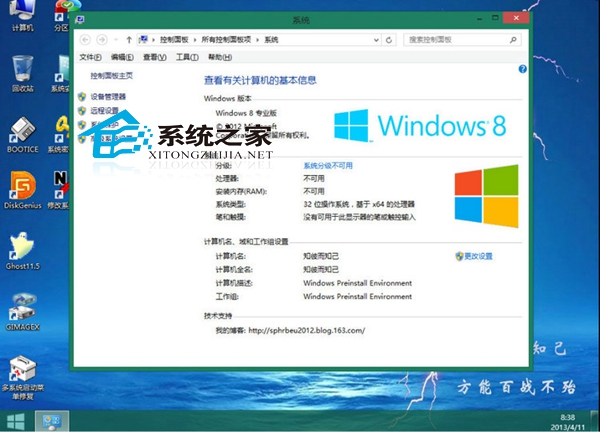
修改後的 PE 系統屬性

所需工具

  • Windows 8 PE 映像檔
  • WimTool (掛載 WIM)
  • Resource Hacker (修改資源)
  • UltraISO (封裝 ISO)

核心步驟 (需以系統管理員身分執行)

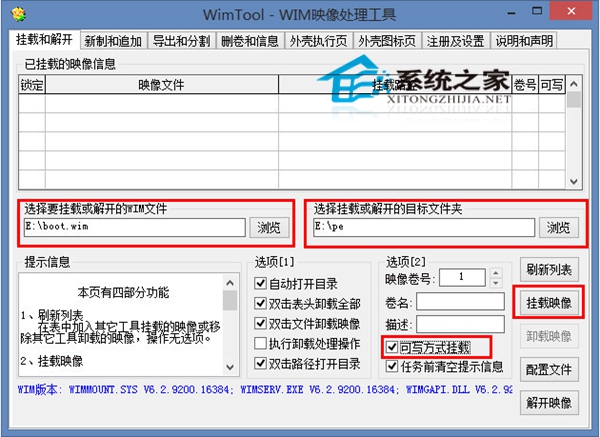
  1. WimTool 掛載 boot.wim (位於 PE 映像 \boot\ 目錄)
  2. 修改掛載目錄下檔案:
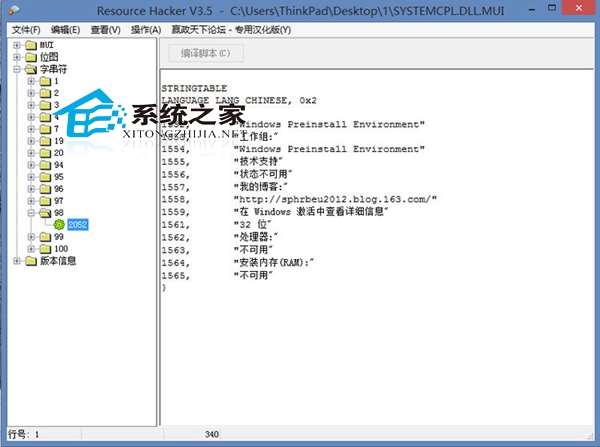
    • 系統屬性文字: Resource Hacker 修改 SYSTEMCPL.DLL.MUI (Windows\System32\zh-CN)
    • 電腦名稱/主機名: 修改 pecmd.ini 加入 REGI 指令設定 ComputerName、Hostname
    • OEM 資訊與 LOGO: 複製 LOGO.BMP 至 Windows\System32\oobe\info,載入 config\SOFTWARE 登錄檔寫入 OEMInformation 路徑
    • 桌面綠色軟體: 修改 Program Files\TOOLS.INI 依格式加入捷徑
  3. 卸載登錄檔、取消掛載、UltraISO 重新封裝 ISO

WimTool 掛載映像

Resource Hacker 修改 DLL

進階提示:修改完成後建議在虛擬機測試驗證,確認無誤再實體部署。PE 定製技術同樣適用於 Win7/Win10 PE 製作。

Copyright © Windows教程網 All Rights Reserved