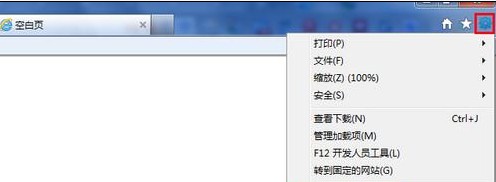
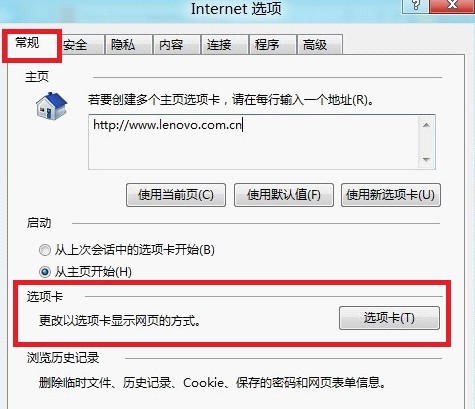
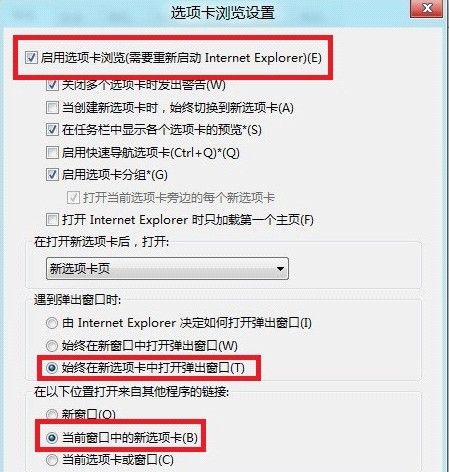
IE 可設定彈出視窗與外部連結均在新索引標籤開啟,避免開啟大量獨立視窗。
Windows 8 將提供 Windows 7 相容模式 確保 x86 應用程式平滑遷移
Windows 8 雙擊開機/首次開機失敗解決方案:關閉快速啟動
Win8 電腦藍屏通用七大修復法:從最後正確配置到硬體檢測
Win8.1 更新後黑屏/藍屏完整修復:安全模式卸載顯卡驅動、DDU 深度清理、升級前預防
Windows 8 網路與共享中心完整圖文教學
Win8.1 重启/快速启动蓝屏 system_thread_exception_not_handled (Wpprecorder.sys)?CMD 解压驱动+禁用 NTFS 压缩修复
Windows 8 使用資源監視器檢視程序網路連線狀態教學
Windows 8.1 桌面右下角顯示「SecureBoot 未正確配置」水印?安裝 KB2902864 修補程式即可移除