Windows XP Windows 7 Windows 2003 Windows Vista Windows 綜合教學 Linux 系統教學
Windows 10 Windows 8 Windows 2008 Windows NT Windows Server 電腦軟體教學

Win8 主題安裝位置在哪?系統主題在 C:\Windows\Resources,自訂主題在 %LocalAppData%\Microsoft\Windows\Themes

編輯:Win8 系統應用技巧

Win8 主題檔案分兩類儲存位置:

  • 系統內建主題: C:\Windows\Resources\Themes,桌面背景在 C:\Windows\Web\Wallpaper。
  • 使用者自行安裝主題: %LocalAppData%\Microsoft\Windows\Themes (即 C:\Users\<使用者>\AppData\Local\Microsoft\Windows\Themes)。

快速開啟自訂主題資料夾

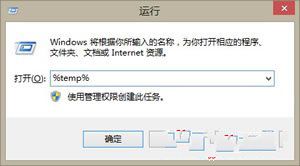
  1. Win+R → %temp% → 開啟 Temp 資料夾。
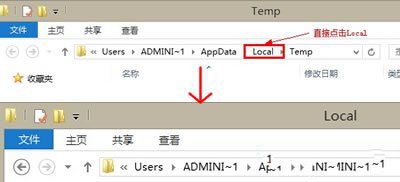
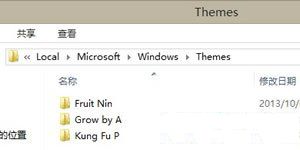
  2. 位址列點選「Local」→ 依序開啟 Microsoft\Windows\Themes。
執行 %temp% 開啟 Local 資料夾 Themes 資料夾內容

方便備份、分享或手動刪除有問題的第三方主題。

Copyright © Windows教程網 All Rights Reserved