Windows XP Windows 7 Windows 2003 Windows Vista Windows 綜合教學 Linux 系統教學
Windows 10 Windows 8 Windows 2008 Windows NT Windows Server 電腦軟體教學

Win8 內建行事曆顯示農曆與節假日完整教學

編輯:Win8 系統應用技巧

身為華人,農曆與節假日查詢是剛需。許多人習慣用第三方軟體或搜尋引擎,其實 Windows 8 內建的行事曆只要訂閱正確的 iCal 連結,就能直接顯示農曆日期與國定假日,完全不需額外安裝軟體。

讓行事曆顯示農曆

  1. 開啟瀏覽器前往 https://login.live.com/,登入 Microsoft 帳號。
  2. 在 Outlook.com(Hotmail)選項中選擇「行事曆」,點擊「訂閱」進入訂閱介面。
  3. 在行事曆連結欄位輸入以下 iCal 位址:
    www.google.com/calendar/ical/khev4hvo95dho74k3km1joavc0%40group.calendar.google.com/public/basic.ics
  4. 確認訂閱,農曆資料即會同步至行事曆。

讓行事曆顯示節假日

步驟相同,僅將訂閱連結改為(注意大小寫):

ical.mac.com/ical/China32Public32Holidays.ics

成果預覽

設定完成後,若將 Metro 開始畫面設為啟動畫面,開機即可直接看到顯示農曆與節假日的行事曆磚,一目了然,非常便利。
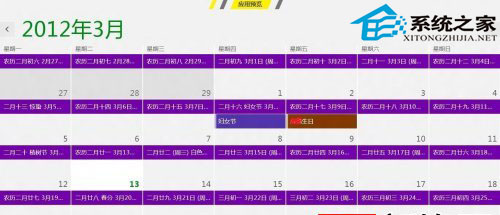
行事曆訂閱設定畫面

Copyright © Windows教程網 All Rights Reserved