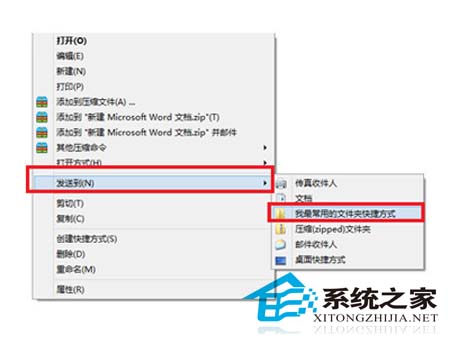
厭倦千篇一律的右鍵選單?善用 Win8 內建的「傳送到」功能,將常用資料夾快捷方式放入特定目錄,即可在右鍵選單中快速存取,大幅提升檔案管理效率。
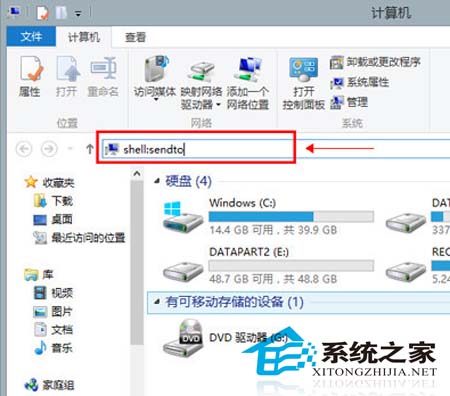
shell:sendto
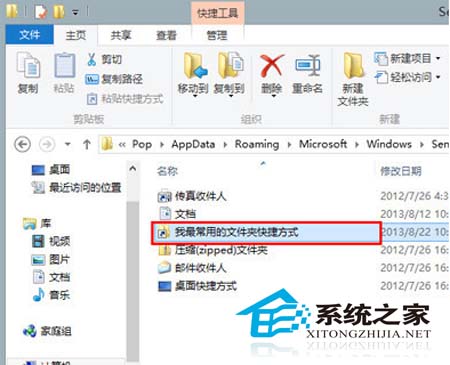
為了更直觀或趣味性,可將捷徑重新命名為「美麗的文字」(如「📁 專案資料夾」、「☁️ 雲端同步」等),讓右鍵選單煥然一新,讓同事驚艷不已。
Win8.1 系統不啟動會有什麼後果?詳細影響與應對說明
Win8 自訂圖示快取大小:修改登錄檔完整步驟
Windows 8 拒絕遠端修改登錄機碼:群組原則清除遠端存取路徑防止惡意利用
Windows 8.1 隱藏功能:滑動關機像手機一樣直覺操作
Windows 8 查看 Metro 應用程式大小與安裝位置完整教學
Win8 百度雲離線下載教學(BT 種子/磁力連結)
Win8 右鍵選單「新增」消失了?登錄檔修復 ContextMenuHandlers\New 預設值
Win8 建行網銀盾 (U盾) 無法識別?裝置管理員更新驅動 6 步驟解決