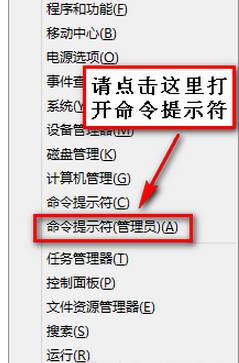
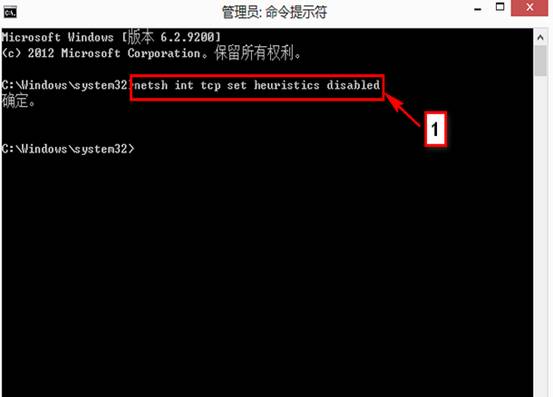
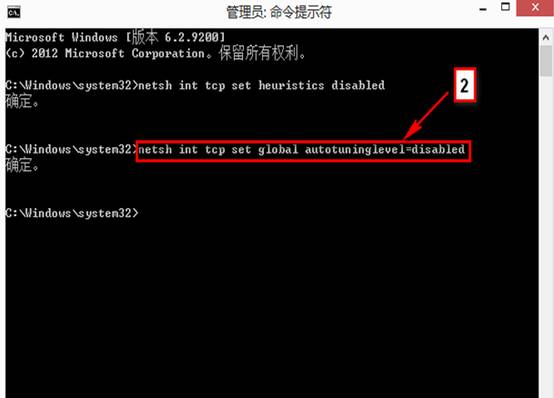
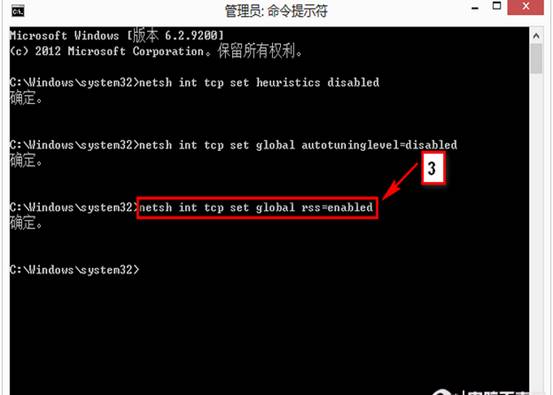
Win8 有線/無線網路出現「受限」黃色驚嘆號,執行以下三條指令優化 TCP/IP 參數:
netsh int tcp set heuristics disabled
netsh int tcp set global autotuninglevel=disabled
netsh int tcp set global rss=enabled
若無效,至裝置管理員移除無線網卡驅動 → 下載廠商最新驅動重裝。
Windows 8 登出時自動清除動態磚過期通知:群組原則設定讓開始畫面永遠乾淨
Windows 8 修改远程桌面默认端口的完整教程
Win8 平板螢幕無法自動旋轉?啟用 Sensor Monitoring Service 服務恢復重力感應
Windows Blue 正式命名為 Windows 8.1:8 月釋出,走 8.x 迭代路線
Win 8 筆電開啟無線網路共享(虛擬 AP)讓手機上網:完整指令與圖文教學
Win8 上手指南全系列:開始畫面、搜尋、超級按鈕、桌面、控制台、關機、休眠完整入門
不用工具也能查:一條 PowerShell 指令讀取預裝 Win8 產品金鑰
Windows 8 資源管理器快速查看系統屬性:右鍵「電腦」屬性捷徑