Windows XP Windows 7 Windows 2003 Windows Vista Windows 綜合教學 Linux 系統教學
Windows 10 Windows 8 Windows 2008 Windows NT Windows Server 電腦軟體教學

WinXP 如何匯出 Cookies?IE「匯入/匯出精靈」→「匯出 Cookie」儲存為文字檔

編輯:Win8 系統應用技巧

Windows XP 時代的 IE 瀏覽器提供「匯入/匯出精靈」可將儲存的 Cookies 匯出為文字檔,方便備份或移轉至其他電腦/瀏覽器。

匯出步驟

  1. 開啟 IE →「檔案」→「匯入及匯出」→「下一步」。
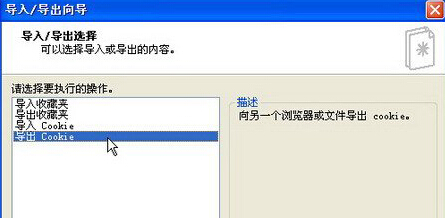
  2. 選擇「匯出 Cookie」→「下一步」。
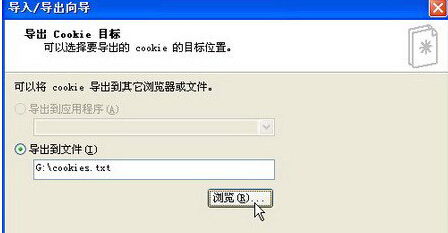
  3. 點「瀏覽」指定儲存位置與檔名 (如 cookies.txt) →「下一步」。
  4. 點「完成」開始匯出,提示成功後按「確定」。
匯入匯出精靈選擇匯出 Cookie 指定匯出檔案位置

現代瀏覽器:Chrome/Edge/Firefox 均無內建 Cookie 匯出功能,需安裝擴充套件 (如 EditThisCookie) 或使用開發者工具 (F12 → Application → Cookies) 手動複製。更多瀏覽器資料管理教學,請關注電腦教程專欄,歡迎加入電腦辦公群(189034526)。


Copyright © Windows教程網 All Rights Reserved