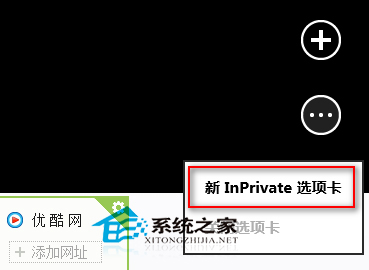
Modern 版 IE11 內建 InPrivate 瀏覽模式,不記錄歷史、Cookie、暫存檔,適合公用電腦或隱私敏感場合。
InPrivate 視窗標題列會顯示藍色「InPrivate」標誌,關閉後所有瀏覽資料自動清除。
Win8 定位功能啟用與使用教學:控制台位置設定
Win8 使用內建 Outlook 傳送電子郵件完整教學
Office 2013 揭曉:整合 Exchange/SharePoint/Lync、連結 Office 365 雲端、支援觸控與社交協作新紀元
Windows 8/8.1 關閉 Modern 鎖定畫面,直接進入登入介面
Win8.1 行動硬碟 USB 3.0 讀不到?補裝原廠驅動 + 掃描更新
Win8.1 設定預設程式圖文教學:瀏覽器、播放器、圖片檢視器一鍵指定
Win8/8.1 刪除休眠檔案 hiberfil.sys 釋放 C 槽空間
Windows 8 關機 6 大技巧:Charms 列、Alt+F4、登出後關機、鎖定後關機、Win+I、Ctrl+Alt+Del