微軟僅向 Windows 7 SP1 與 Windows 8.1 Update (含後續累積更新) 使用者推送免費升級 Windows 10 通知。若你符合版本却收不到,請檢查 Windows Update 設定。
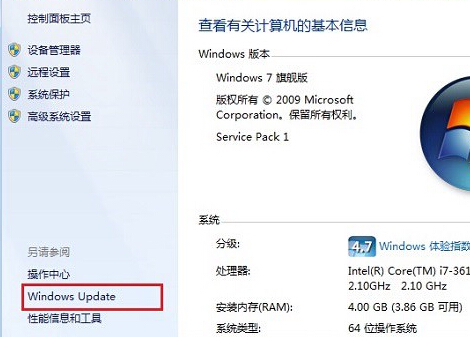
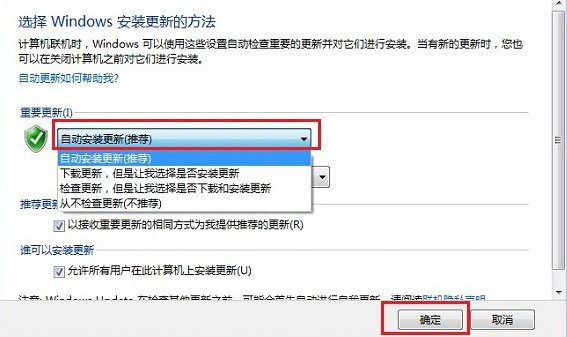
注意:免費升級優惠已於 2016 年 7 月 29 日結束,現若需升級 Windows 10 需購買授權或使用辨識工具 (如通用啟動碼) 進行啟動。本文僅供歷史情境參考。
更多系統升級與更新管理教學,請關注電腦教程專欄,歡迎加入電腦辦公群(189034526)。
Win8/8.1 如何查看 DirectX 版本?Win+R 輸入 dxdiag 秒出系統頁版本號
Win8 藍屏 0x000000ED 硬碟壞軌修復指南:軟體修復到硬體更換
Windows 8 隱藏功能啟用實驗:Paint Ribbon UI、エクスプローラ Ribbon、攝影機應用、任務管理員新介面
Win8 如何設定開機直接進入桌面?控制台→外觀和個人化→更改主題→工作列和導航→勾選「登入時直接進入桌面」
Windows 8 桌面圖示無法拖曳排列?四招快速修復:自動排列、重啟 Explorer、Esc 鍵、移除第三方工具
Win8 應用程式商店切換地區下載外區應用程式:將系統地區改為美國即可搜尋 Skype 等應用