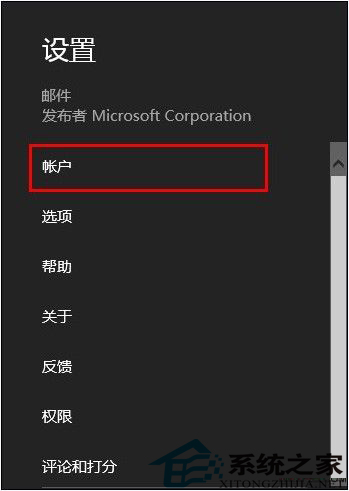
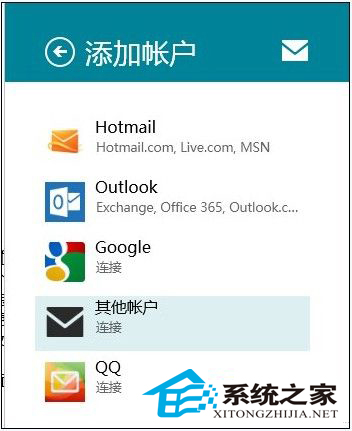
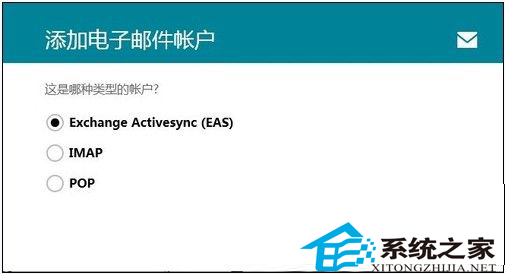
Win8.1 郵件應用支援多帳號聚合,新增步驟:
支援 IMAP 最佳同步體驗,POP 需注意伺服器設定正確性。
Win8 將 IE HTML 編輯器設定為記事本教學(簡略版)
Win8 瀏覽網頁滑鼠滾輪失效?啟用通用滾輪功能修復
Windows 8 十大優缺點深度評測:內建廣告、應用商店內購、RT 混淆、強大搜尋、桌面/Metro 不兼容、檔案傳輸暫停、任務管理器增強、截圖自動存檔、空白介面與缺乏右鍵
Win8 關閉程式相容性助手:服務停用與登錄兩法
Win8 設定桌面鎖定畫面壁紙教學
Win8 IE10 開發者工具捕獲 CNTV 線上影片網址教學
Win 8 如何查看已連接 Wi-Fi 密碼?圖文步驟教學
Windows 8 輸入法圖標消失/無法切換解決方案:任務欄設置與 Scm 文件夾修復