Win8 開機 Logo 後黑屏 30 秒以上?將「Windows Font Cache Service」設為自動啟動:
方法一:services.msc
- Win+R →
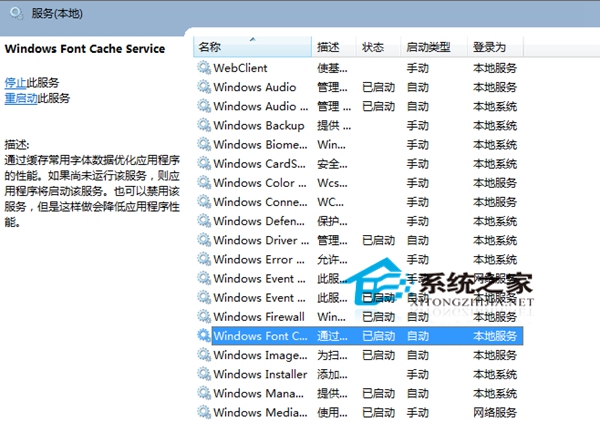
services.msc → 找到 Windows Font Cache Service。
- 右鍵「內容」→ 啟動類型改「自動」→ 確定 → 右鍵「啟動」。
方法二:電腦管理
- 右鍵「這台電腦」→「管理」→「服務及應用程式」→「服務」。
- 找到 Windows Font Cache Service → 啟動類型改「自動」。
設定完成重開機,開機速度明顯加快。